|
Hello Hans,
Please attach screenshot with top output.
If you disable your ODBC items, does the memory leak stops?
Would it be possible to test with an older version of I Access connector?
|
|
I started out with an older version (1.1.0.9) that showed the same behaviour. I have also opened a PMR with IBM to investigate possible memory leak in the ODBC driver - no news from that so far.
I tried to remove some of the db.odbc items (left over from low level discovery items that are no longer relevant). After that I see the drop flatten off, but it will still drop steadily - indicating to me that it is indeed some memory per odbc call that is left behind. Please see attachments.
|
|
As this is a very small Zabbix instance, could it be run under Valgrind for a few minutes? That could be the easiest way to find memory leak.
Example:
|
|
How many poller processes do you have? How many ODBC datasources are you querying? Due to connection pooling on UnixODBC side and the fact that Zabbix does not allocate specific pollers for specific datasources, every poller will eventually have a pool of connections to all datasources you have. Until that happens allocations will be happening and it may look like a memory leak.
|
|
HI, I try to run valgrind as an admin user but I get access denied on reading the config file, access path /var/run/zabbix etc. If I try to sudo the command I get an error that zabbix cannot run as root. My admin user is member of the wheel group. I also tried to put it in the zabbix group.
What am I doing wrong? Thanks...
|
|
Do you have SELinux enabled?
|
|
SELinux is disabled
|
|
@Glebs: At this point we have about 15 ODBC datasources, will end up with around 50. I ran into pollers being too busy earlier so I increased to 50 which is probably too much at this point. Each datasource will have a dynamic amount of db items, probably between 5 and 50.
|
|
Why not run Valgrind as zabbix user?
|
|
(edit: sorry about the formatting):
Do you mean like this:
{{sudo -H -u zabbix valgrind -v --tool=memcheck --leak-check=full --trace-children=yes --track-origins=yes --time-stamp=yes --max-stackframe=3475144 }}
{{ --log-file=/var/log/zabbix/zabbix_server_%p --leak-resolution=high --show-leak-kinds=all zabbix_server -c /etc/zabbix/zabbix_server.conf}}
It started but ran very slow - causing many alerts (because of timeouts I think). The server ended up dying with:
{{ 40201:20190304:115014.189 One child process died (PID:40251,exitcode/signal:9). Exiting ...}}
zabbix_server [40201]: Error waiting for process with PID 40251: [10] No child processes
{{ 40201:20190304:115130.965 [Z3001] connection to database 'zabbix' failed: [2002] Can't connect to local MySQL server through socket '/var/lib/mysql/mysql.sock' (111)}}
{{ 40201:20190304:115131.000 Cannot connect to the database. Exiting...}}
Is there perhaps a way to only start the poller processes with valgrind?
|
|
You can install Zabbix proxy on the same system, move one ODBC check to proxy and run proxy with Valgrind. It won't affect the performance of Zabbix server and should be enough to catch the memory leak if there is one. Proxy shares a lot of code with server.
|
|
Not that small instance if it cannot run under Valgrind. Glebs advice could help.
|
|
I already had a proxy with only 1 host (no db checks - and memory usage a flat horizontal line). I activated a few db checks on that host and saw a slight steady memory drop. After a few hours I then started it with valgrind:
sudo -H -u zabbix valgrind -v --tool=memcheck --leak-check=full --trace-children=yes --track-origins=yes --time-stamp=yes --max-stackframe=3475144
--log-file=/var/log/zabbix/zabbix_proxy_%p --leak-resolution=high --show-leak-kinds=all zabbix_proxy -c /etc/zabbix/zabbix_proxy.conf
I let it run for some hours and ended with
sudo pkill -u zabbix
And searched the logs with
sudo grep -rnw '/var/log/zabbix/' -e 'definitely lost'
I see quite a few lines like this:
/var/log/zabbix/zabbix_proxy_35187:2640:==00:00:00:03.624 35187== 59 bytes in 1 blocks are definitely lost in loss record 261 of 292
But I'm not sure if that is what I'm looking for.
I'm attaching the logs for the poller threads.valgrind_proxy.tar.gz
Would this also reveal a memory leak in the odbc driver?
|
|
Well...
Was that a poller?
Would this also reveal a memory leak in the odbc driver?
Yes, Valgrind tracks all allocations.
|
|
Hmm yes it seems the pollers are not leaking.
Some other examples:
/var/log/zabbix/zabbix_proxy_46518:1216:==00:00:00:02.751 46518== 24 bytes in 1 blocks are definitely lost in loss record 124 of 285
/var/log/zabbix/zabbix_proxy_46518:2546:==00:00:00:02.762 46518== 58 bytes in 1 blocks are definitely lost in loss record 255 of 285
/var/log/zabbix/zabbix_proxy_46518:2842:==00:00:00:02.763 46518== definitely lost: 82 bytes in 2 blocks
/var/log/zabbix/zabbix_proxy_46519:1275:==00:00:00:03.433 46519== 24 bytes in 1 blocks are definitely lost in loss record 128 of 292
/var/log/zabbix/zabbix_proxy_46519:2640:==00:00:00:03.441 46519== 59 bytes in 1 blocks are definitely lost in loss record 261 of 292
/var/log/zabbix/zabbix_proxy_46519:2946:==00:00:00:03.443 46519== definitely lost: 83 bytes in 2 blocks
/var/log/zabbix/zabbix_proxy_47109:2656:==00:00:00:04.006 47109== definitely lost: 0 bytes in 0 blocks
/var/log/zabbix/zabbix_proxy_47111:1216:==00:00:00:02.621 47111== 24 bytes in 1 blocks are definitely lost in loss record 124 of 285
/var/log/zabbix/zabbix_proxy_47111:2546:==00:00:00:02.629 47111== 58 bytes in 1 blocks are definitely lost in loss record 255 of 285
/var/log/zabbix/zabbix_proxy_47111:2842:==00:00:00:02.631 47111== definitely lost: 82 bytes in 2 blocks
/var/log/zabbix/zabbix_proxy_47113:1275:==00:00:00:03.511 47113== 24 bytes in 1 blocks are definitely lost in loss record 128 of 292
/var/log/zabbix/zabbix_proxy_47113:2640:==00:00:00:03.520 47113== 59 bytes in 1 blocks are definitely lost in loss record 261 of 292
/var/log/zabbix/zabbix_proxy_47113:2946:==00:00:00:03.522 47113== definitely lost: 83 bytes in 2 blocks
Attaching the logs. Looks like pingers.
memchecks.zip
|
|
It reports leaks in /usr/bin/bash  Probably a fork of poller for external script execution. Probably a fork of poller for external script execution.
|
|
OK. Thanks for checking.
If this also rules out the ODBC driver I should close the ticket I have open with IBM, do you agree?
Any idea how to find the cause of the problem on the server then?
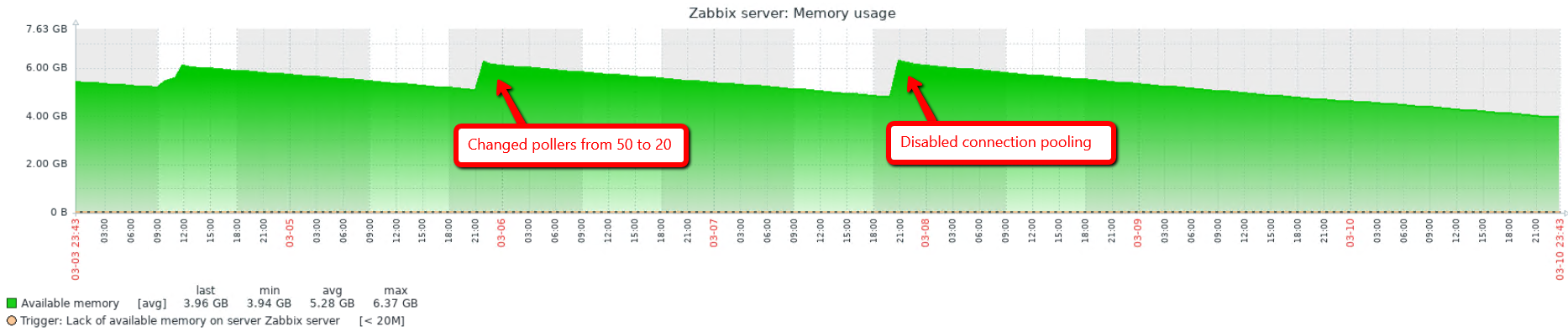
I have lowered the number of pollers to 20, just to see if the behaviour changes.
|
|
Let's do the following experiment. If you restart the proxy with a different number of poller processes (StartPollers=5, =10, =20, =50, etc.), will you see the changes in how quickly available memory disappears?
If there is the same number of ODBC items, same intervals, same amount of data gathered, etc. then the decrease should not depend on the number of pollers.
If my wild guess about connection pooling is right, then more poller processes will "leak" memory faster since every one of them does its independent pooling.
By the way, pooling can be switched off in UnixODBC settings (in odbcinst.ini file, per driver). You can try it on server in the meantime.
|
|
I changed the number of pollers from 50 to 20 and rebooted the server.
The line still looks the same, please see attachment.
I then disabled connection pooling and rebooted the server.
odbcinst.ini after the change: odbcinst.ini
I have attached the first screen of ps aux --sort -rss | more
pollers_memory.txt
|
|
Here is a fresh snapshot of ps aux --sort -rss
pollers_memory_2.txt
|
|
Looks like my guess about pooling isn't correct. Could you repeat Valgrind run?
|
|
I can't run valgrind on the server (it can't handle the extra load I think). On the proxy I only have access to one host at present (network topology). Are there alternative ways of investigating on the server you think?
|
|
You can run a proxy on the same machine as server, just make sure they don't compete for the same listening port, log file, pid file, etc. Or even a separate Zabbix server with it's own database and frontend. I guess your system will handle a small Zabbix server under Valgrind.
|
|
I haven't had the time to setup the proxy on the server and move over some hosts. However I got an update from IBM that wanted some pmap output.
I see this at the top of pmap -x on poller #1:
Address           Kbytes     RSS   Dirty Mode  Mapping
0000557cca345000    2276     732       0 r-x-- zabbix_server_mysql
0000557cca77d000     428     428     428 r---- zabbix_server_mysql
0000557cca7e8000      44      44      44 rw--- zabbix_server_mysql
0000557cca7f3000      32      20      20 rw---   [ anon ]
0000557ccb245000     132     120     120 rw---   [ anon ]
0000557ccb266000     292     244     244 rw---   [ anon ]
0000557ccb2af000   44976   44852   44852 rw---   [ anon ]
00007f9a67c7e000    2848    2636    2636 rw---   [ anon ]
And 15 minutes later:
Address           Kbytes     RSS   Dirty Mode  Mapping
0000557cca345000    2276     732       0 r-x-- zabbix_server_mysql
0000557cca77d000     428     428     428 r---- zabbix_server_mysql
0000557cca7e8000      44      44      44 rw--- zabbix_server_mysql
0000557cca7f3000      32      20      20 rw---   [ anon ]
0000557ccb245000     132     120     120 rw---   [ anon ]
0000557ccb266000     292     244     244 rw---   [ anon ]
0000557ccb2af000   45372   45248   45248 rw---   [ anon ]
00007f9a67c7e000    2848    2656    2656 rw---   [ anon ]
Does the increase in the anon line indicate something to you? Thought I'd pass this on.
|
|
Yes, growing 'anon' could be a memory leak, but you need to observe a longer interval - does its average value grows over time.
|
|
about 5 hours more:
4256:   /usr/sbin/zabbix_server: poller #1 [got 0 values in 0.000013 sec, idle 1 sec]
Address           Kbytes     RSS   Dirty Mode  Mapping
0000557cca345000    2276     732       0 r-x-- zabbix_server_mysql
0000557cca77d000     428     428     428 r---- zabbix_server_mysql
0000557cca7e8000      44      44      44 rw--- zabbix_server_mysql
0000557cca7f3000      32      20      20 rw---   [ anon ]
0000557ccb245000     132     120     120 rw---   [ anon ]
0000557ccb266000     292     244     244 rw---   [ anon ]
0000557ccb2af000   50124   49996   49996 rw---   [ anon ]
00007f9a6787d000    4100    3596    3596 rw---   [ anon ]
00007f9a68047000      60       8       0 r-x-- libbz2.so.1.0.6
00007f9a68056000    2044       0       0 ----- libbz2.so.1.0.6
00007f9a68255000       4       4       4 r---- libbz2.so.1.0.6
|
|
Again this morning (10 hours since last check):
4256:   /usr/sbin/zabbix_server: poller #1 [got 0 values in 0.000011 sec, idle 1 sec]
Address           Kbytes     RSS   Dirty Mode  Mapping
0000557cca345000    2276     732       0 r-x-- zabbix_server_mysql
0000557cca77d000     428     428     428 r---- zabbix_server_mysql
0000557cca7e8000      44      44      44 rw--- zabbix_server_mysql
0000557cca7f3000      32      20      20 rw---   [ anon ]
0000557ccb245000     132     120     120 rw---   [ anon ]
0000557ccb266000     292     244     244 rw---   [ anon ]
0000557ccb2af000   60816   60736   60736 rw---   [ anon ]
00007f9a6787d000    4100    3596    3596 rw---   [ anon ]
00007f9a68047000      60       8       0 r-x-- libbz2.so.1.0.6
|
|
Can you make little modifications to Zabbix source code and recompile?
(not all users can do that, some are allowed to use only official packages, some do not have development tools on their machines)
|
|
I have no experience doing that sorry. Is it possible to describe what I should do? We can install what we need on the box.
|
|
Hi, I got this reply from IBM:
So from the pmap -x output, specifically the
Address Kbytes RSS Dirty Mode Mapping
0000557ccb2af000 50124 49996 49996 rw--- [ anon ]
indicates that this is anonymous memory allocation.
The only way this happens is if mmap(2) function is
used with MAP_ANONYMOUS flag. Our developer
reviewed our ODBC driver code and no where does
our driver allocate memory in that fashion and the only
places we can find that use mmap() are in tracing and
message file handling, but neither use
MAP_ANONYMOUS – only MAP_SHARED and
MAP_PRIVATE, respectively.
The developer wrote a test which created 1000 threads,
each opening one of 4 converters sequentially in a loop
for a 1000 times. Here's what is found:
- Once all the converters were opened, they were always
found in the list and the list never grew above the 4
(matches the combinations I defined)
- For any given ccsid combination, the same conversion
object was always returned
(same address - makes sense from above)
- valgrind showed no memory leaks
Based on our investigation it does not appear to be a memory
leak in the IBM i Linux ODBC driver.
More than likely there is a memory leak somewhere else
in the application when ODBC is being used.
|
valgrind showed no memory leaks
Funny enough, this is what we saw with Zabbix as well.
Dear andris, do you recall "minimal ODBC code"? Maybe you can share it with hab and provide instructions how to compile and run it. I guess it will be easier than setting up a proxy. And maybe Valgrind will be able to find something.
|
|
Hi!
Did you try to disable ODBC checks (individual items or group of items) to see if memory leak continues ?
|
|
Memory leak slows down when ODBC item count is reduced:

|
|
Does disabling unixODBC checks make leak go away ?
|
|
Hi Vladislavs,
Could I just rename /etc/odbcinst.ini and reboot the server? Or what method do you have in mind? It would be quite tedious to disable all the odbc items individually.
|
|
Yes, you could try that, to rule out unixODBC. After that if it still unixODBC then you could move just one unixODBC check to new Zabbix proxy and see if it leaks or not and run with valgrind, would be nice to know if it's all unixODBC checks or only those that are using IBM driver. If it's IBM driver checks that leak would be nice to know if all of them leak or some specific queries.
|
|
OK I'll rename the file and reboot the server.
As far as I know the only ODBC calls we have are with the IBM driver.
|
|
As proposed by cyclone, I attached his odbcmin.c program. It is a small test program, it makes just one ODBC check.
Compile it like
Run it like
Adjust DSN, Username, Password and Query according to your environment in the "printf" command above.
When you get it working, run it under Valgrind like
Find Valgrind's output file in /tmp, compress it with gzip, like
Upload it (odbcmin_9629.gz) to https://support.zabbix.com/browse/ZBX-15747 as attachment.
|
|
I disabled ODBC the other day and let it run for a while:

I have enabled it again.
Thank you for your instructions. I have compiled it and made a test run with valgrind - I hope the output is what you expect. I'm attaching it here.
odbcmin_46598.gz
|
|
Hi, Hans!
I looked into odbcmin_46598.gz. There are 2 "definitely lost" records:
Could you forward odbcmin.c program and odbcmin_46598.gz file to IBM support?
|
|
Hi Andris,
Thank you. I have re-opened the PMR and sent the items to IBM. So in your opinion this is purely an IBM problem?
|
So in your opinion this is purely an IBM problem?
I cannot say it. It could be IBM iaccess library or it could be that we are not using it properly. IBM support can run 'odbcmin' and see in detail where wrong things happen (IBM iaccess seems to be closed source).
|
|
Note that Zabbix does not use ODBC drivers directly, there is also UnixODBC in between, which may not be perfect as well.
|
|
Time for an update. I received a test fix from IBM. It definitely had an impact (see screenshot)

I still see a steady decline in the memory. I'll let it run now and see if it stabilizes.
I'm attaching a new output of the odbcmin test program using the test fix odbc driver.
Can you tell from that if the odbcdriver is still at fault or if it is something else (I see 2 errors/warnings in the trace)
odbcmin_26248
|
|
odbcmin_26248
|
|
I looked into odbcmin_26248 Valgrind results. Yes, Valgrind sees 2 memory issues. They are deep into IBM code where C++ is used to implement parts of driver. I think only IBM developers who have access to source code can tell if it is a real problem or false positive.
On the other hand. odbcmin is a really minimal program - if even it shows problems then what to expect from a long running program ...
|
|
Hi Andris, thank you for your input. I have relayed this to IBM and will wait for their response.
|
|
No indication of a bug in Zabbix, closing as commercial support required.
|
|
I actually contacted Zabbix to get paid assistance before even opening this ticket. They referred me to opening it before they could help. How should I proceed then?
Meanwhile I received this update from IBM:
In the latest valgrind report from the customer, there are 184 loss records. Most of those are from unixODBC (libodbc.so) or libdl (dlopen stuff). The libdl are most likely due to us never being dlclosed, which is expected. This is a one-time cost throughout the lifetime of the process, so not significant.
There are also losses due to application bugs: the connection is never closed, which causes the SQLFreeHandle of both the dbc and env handles to fail since they are in use. After inserting an SQLDisconnect after the SQLFreeHandle of the stmt, my valgrind report went from 170 to 136.
There's certainly still some problems here, there are 2 error records noted in the valgrind report from the customer, while I see more in my current build. Those are definitely worth looking at, but I think there are probably more issues with unixODBC itself at this point, especially during SQLConnect processing.
In other words, the most benefit (from perspective of memory usage) would be for the application to add calls to SQLDisconnect.
– end of quote –
Any suggestions?
|
|
First things first. Don't read my words as an official response from Zabbix.
Speaking of SQLDisconnect(), that's problem of odbcmin.c, Zabbix does call SQLDisconnect(). But this is UnixODBC's SQLDisconnect() and there is no guarantee that driver's SQLDisconnect() will be called, especially if UnixODBC is configured to do connection pooling.
Your last available memory graph 2019-04-12_1159.png wasn't looking that bad.
I still see a steady decline in the memory. I'll let it run now and see if it stabilizes.
So... Has it stabilized or not? Was UnixODBC connection pooling enabled when you got this graph and odbcmin_26248?
|
|
I have attached a version of odbcmin.c with SQLDisconnect(). Could you run it under Valgrind in your environment? Let's see if the missing SQLDisconnect() is causing all the mess.
|
|
Hi Glebs.
No problem, just trying to figure out how to proceed. I understand that odbcmin behaves differently.
The decline is still steady:

I guess I could schedule a weekly reboot.
Pooling was disabled then and still is.
|
|
OK, judging by the graph, it leaks 200 MB a day. Let's estimate how many ODBC checks your Zabbix server performs per day. We should see if the numbers are the same we get from Valgrind run of odbcmin.c (which models a single ODBC check). Maybe there is something else happening. Maybe it's time to reach UnixODBC developers.
|
|
Please feel free to reopen the ticket if you still think there is a bug in zabbix hab, we will be happy to investigate.
|
|
I ran another test with the new odbcmin.c - attached here
odbcmin_32719
|
|
A-a-and... It's perfect!
|
|
That's great news. I let IBM know it too.
I have scheduled a weekly reboot now, so I think we won't run into problems. I'm still a bit curious why memory is consumed like this, but maybe it's not the pollers anymore.
Thank you (all) for all your help in getting this nailed.
|
Generated at Sun Apr 19 14:27:25 EEST 2026 using Jira 10.3.18#10030018-sha1:5642e4ad348b6c2a83ebdba689d04763a2393cab.
 2019-03-01_1540.png
 memchecks.zip
 odbcinst.ini
 odbcmin_26248
 pollers_memory.txt
 Team A



