image-2020-05-12-11-18-55-228.png
image-2024-01-16-10-14-14-285.png
image-2020-05-12-11-18-55-228.png
image-2024-01-16-10-14-14-285.png
 template_export.json
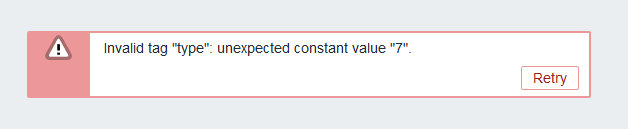
[ZBX-17687] Unable to export template: 'Invalid tag "type": unexpected constant value "7".' Created: 2020 May 07 Updated: 2024 Jan 16 Resolved: 2020 Jul 22 |
|
| Status: | Closed |
| Project: | ZABBIX BUGS AND ISSUES |
| Component/s: | API (A), Frontend (F) |
| Affects Version/s: | 4.4.7 |
| Fix Version/s: | None |
| Type: | Incident report | Priority: | Trivial |
| Reporter: | Alain Devarieux | Assignee: | Renats Valiahmetovs (Inactive) |
| Resolution: | Won't fix | Votes: | 0 |
| Labels: | None | ||
| Remaining Estimate: | Not Specified | ||
| Time Spent: | Not Specified | ||
| Original Estimate: | Not Specified | ||
| Environment: |
Centos 7, Zabbix 4.4.7, MariaDB 10.2 |
||
| Attachments: |
image-2020-05-12-11-18-55-228.png
image-2024-01-16-10-14-14-285.png
template_export.json
|
| Description |
|
Steps to reproduce: I'm not sure about the way to reproduce the issue. I have an old template coming from Zabbix 2.2. 'Template OS Linux'. On this template, some triggers are of type 7.
Result: {{Exemple of trigger coming from api template.get {'triggerid': '13243', 'expression': ' {193603}>60', 'description': 'Disk I/O is overloaded on {HOST.NAME}', 'url': '', 'status': '0', 'value': '0', 'priority': '2', 'lastchange': '0', 'comments': 'OS spends significant time waiting for I/O (input/output) operations. It could be indicator of performance issues with storage system.', 'error': '', 'templateid': '0', 'type': '0', 'state': '0', 'flags': '0', 'recovery_mode': '0', 'recovery_expression': '', 'correlation_mode': '0', 'correlation_tag': '', 'manual_close': '1', 'opdata': ''}}} Expected: |
| Comments |
| Comment by Alain Devarieux [ 2020 May 07 ] |
|
Unfortunately, even after modifying all triggers, the error is the same : 'Error -32500: Application error., Invalid tag "type": unexpected constant value "7".' I did an export using pyzabbix. |
| Comment by Andrei Gushchin (Inactive) [ 2020 May 12 ] |
|
Really strange case. Do you have all constraints on the place? Did you perform any DB schema changes? |
| Comment by Alain Devarieux [ 2020 May 12 ] |
|
No constraints and no DB schema changes have been made. It's the Zabbix MySQL Database Schema without any modification. In the webui, the error message is exactly the same : Invalid tag "type": unexpected constant value "7".
Debug button don't show on the page when this error happens. I don't know how to get more information on what parameter in the template is causing this issue.
Also, I'm able to do a Full Clone of the template without issue. But I have the same error when exporting the clone. |
| Comment by Renats Valiahmetovs (Inactive) [ 2020 Jul 06 ] |
|
Hello Alain, This is a very strange issue, but if we consider the error message and the type being 7, it most likely has something to do with items in the template, as triggers cannot have a value other than 0 or 1, items, however can range from 0 to 19. Did this issue appear after you have upgraded to 4.4.7? I would suggest upgrading to the latest minor version of 4.4.10 and checking if the issue will still be present. Best Regards, Renats |
| Comment by Renats Valiahmetovs (Inactive) [ 2020 Jul 14 ] |
|
Hello Alain, We have noticed that this issue has not been updated for a long time. May we assume that this case is resolved? If it is not and requires additional work, please comment on the ticket and we will respond accordingly. Alternatively, we're going to change the state of the issue to Resolved in 14 days if we don't hear back from you. Best Regards, Renats |
| Comment by Renats Valiahmetovs (Inactive) [ 2020 Jul 22 ] |
|
Hello! This issue has not been updated for more than 14 days. We are automatically closing this issue, but if the problem is not yet resolved and requires additional work, you may reopen it within the next 30 days by commenting on the ticket. Best Regards, Renats |
| Comment by Wojciech [ 2024 Jan 16 ] |
|
Hi, I checked all the triggers and selected the appropriate options in this field and the export went without a problem. |