|
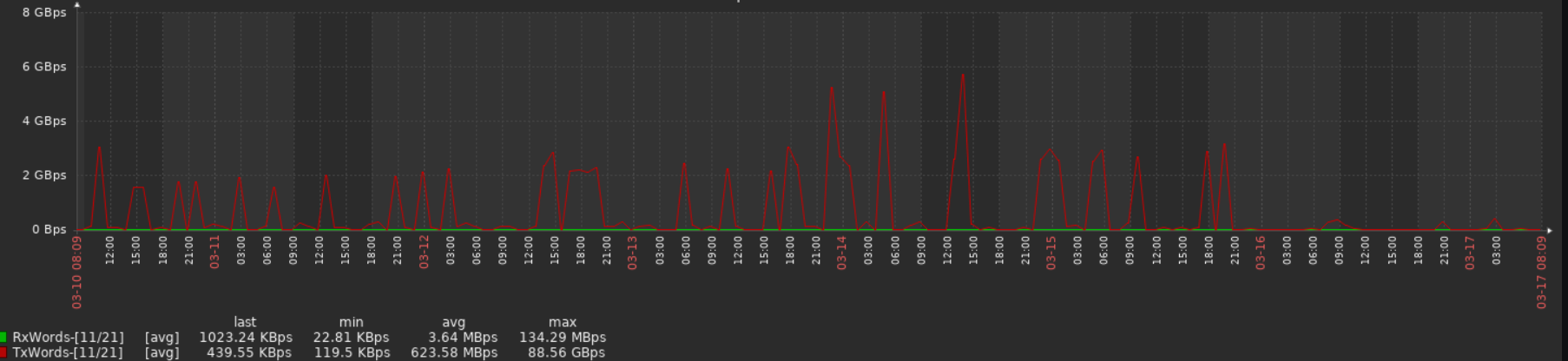
I see this same behavior on Juniper SRX and J series. Zabbix 5.2.6. I was not able to determine the cause yet.
What I can say is that it doesn't happen with others tools that collect the same data from these routers.
|
|
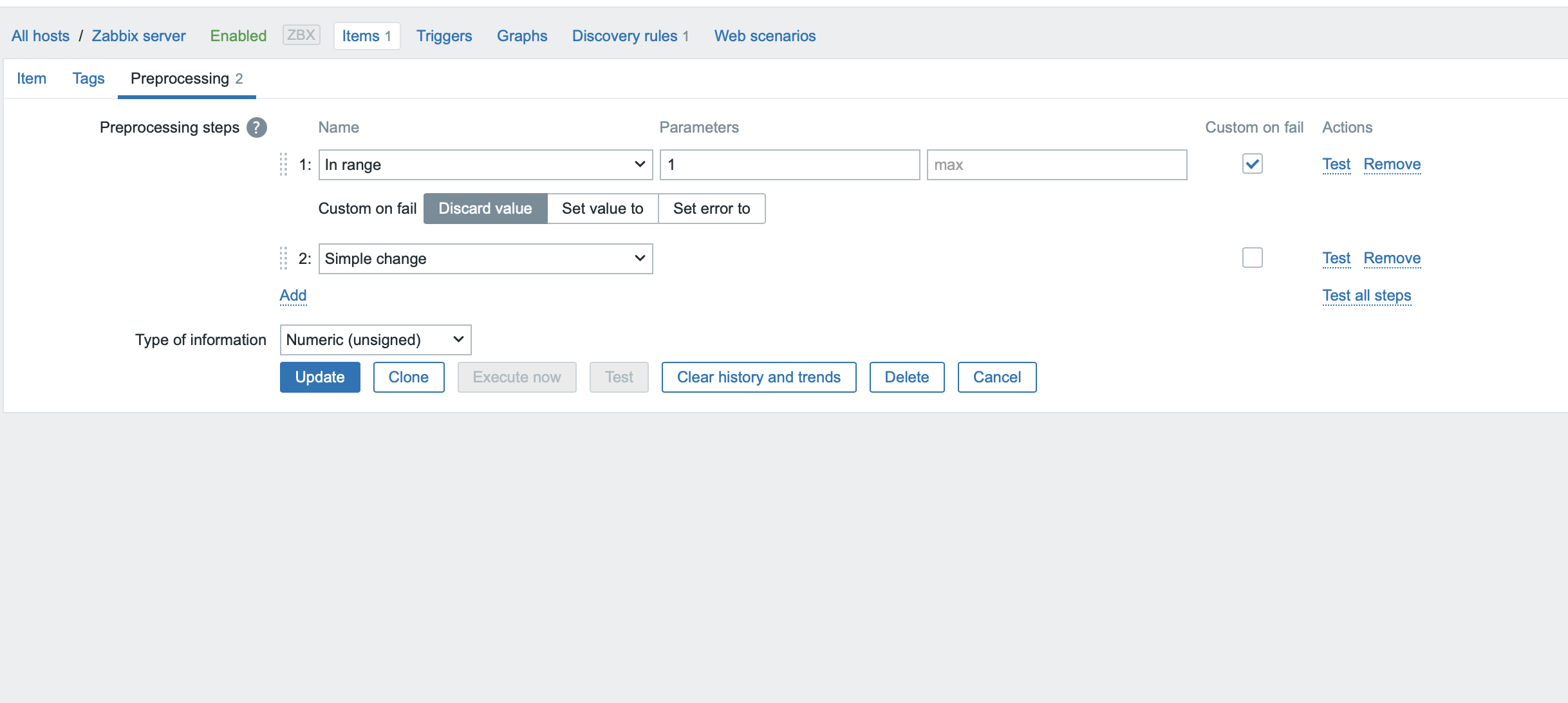
Could you set up another item collecting the exact same OID, but without any preprocessing? Just raw values with no change per second.
|
|
I would like add to this threads, we discover the same on problem of one of our customer...
See this picture (SNMP_bandwith_spike.png) the Switch port is a 16Gbit port but we have spike of 80GBYTE... 
We have disable the SNMP Bulk since the beginning because this switches are Brocade.
@DevTeam is a real Bug?
PS: I forgot to mention that we are using Zabbix 5.0.14 version
Thanks so much
|
|
Here is data from change per second item and raw item.
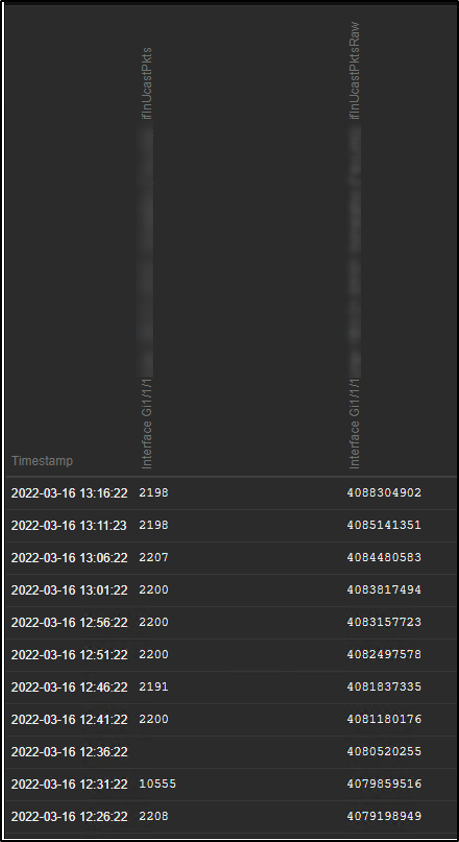
I wrote text below to forum thread yesterday (Zabbix 5.4.8 False High Bandwidth Monitoring - ZABBIX Forums):
"Made really interesting observation today when looked pcap-data.
In this case I have double items to read ifInUcastPkts OID.
One to calculate packet per second values and one for raw values.
This set seems to be related to item with raw values. Counter values increases at constantly.
"frame.time": "Mar 16, 2022 12:26:22.496782000 FLE Standard Time",
"1.3.6.1.2.1.2.2.1.11.10277: 4079198949"
"frame.time": "Mar 16, 2022 12:31:22.439778000 FLE Standard Time",
"1.3.6.1.2.1.2.2.1.11.10277: 4079859516" (diff to previous 660 567)
"frame.time": "Mar 16, 2022 12:36:22.514265000 FLE Standard Time",
"1.3.6.1.2.1.2.2.1.11.10277: 4080520255" (diff to previous 660 739)
"frame.time": "Mar 16, 2022 12:41:22.425662000 FLE Standard Time",
"1.3.6.1.2.1.2.2.1.11.10277: 4081180176" (diff to previous 659 921)
This set seems to be related to pps item.
"frame.time": "Mar 16, 2022 12:26:22.522068000 FLE Standard Time",
"1.3.6.1.2.1.2.2.1.11.10277: 4079198949"
"frame.time": "Mar 16, 2022 12:31:22.497455000 FLE Standard Time",
"1.3.6.1.2.1.2.2.1.11.10277: 4082365523" (diff to previous 3 166 574)
"frame.time": "Mar 16, 2022 12:36:22.556665000 FLE Standard Time",
"1.3.6.1.2.1.2.2.1.11.10277: 4080520255" (diff to previous -1 845 268)
"frame.time": "Mar 16, 2022 12:41:22.455305000 FLE Standard Time",
"1.3.6.1.2.1.2.2.1.11.10277: 4081180176" (diff to previous 659 921)
Negative counter values?!?!
It seems that Cisco IE-5000 switch sends faulty counter values when snmp bulk requests are used."
|
|
It's a well known fact that some devices behave "interestingly" if bulk requests are used.
Can you check if the same happens with bulk turned off?
Just a wild guess is that it somehow mixes metrics from different indexes, then you really might see negative or huge spikes.
|
|
At least Cisco IE-5000 seems to be ok when bulk requests are turned off.
However other user said that disabling bulk requests didn't solve the problem completely.
Packet capture is the final truth... So I encourage users to capture traffic and look how the switch is responding.
|
|
Hi all. Has anyone made any progress on finding the root cause for this problem? Thanks.
|
|
This comment is about an SNMP ifHCOutOctets item.
We are experiencing the same issue and I think that in our case it's related to the fact that some devices don't always report the SNMP value when polled. These are all devices that have a tiny CPU. This results in missing values in the item's history.
The next time the device is polled and the Change Per Second preprocessing is run, the following appears to happen:
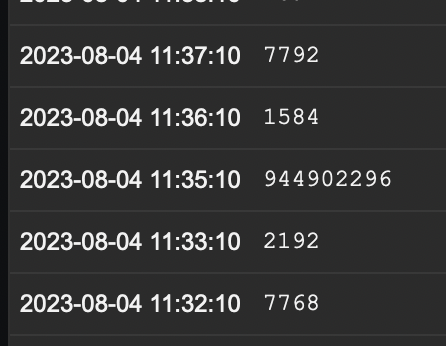
The Change Per Second preprocessor sees the previous missing value and takes it to be 0. The ifHCOutOctets from the device is of course the total number of bytes sent since boot and is a very large value, causing the result to be ludicrously large.
Every single time this happens for us, the item's history has a missing entry, like this:
|
|
It looks like values that are less than previous come
|
|
All the "normal" values are deltas, so relative to the previous value.
The issue here is that when one value goes unreported by the device (for whatever reason, in our case usually devices with small CPUs) the next delta is calculated relative to 0. What Zabbix should do is ignore the missing value and use the previously recorded value.
|
|
Is it possible that 0 was received ?
does something like this help
|
|
I checked with tcpdump, and this happens when there's no reply for some reason.
But your suggestion looks very promising. I'm going to test that out right away! Thanks!
|
|
History is always updated to new value, but when newer value comes that is less than previous then result is of calculation is discarded (that's why there is missing value), however when new value arrives then it checks change with this previous value, if previously value is incorrect (for example 0) then calculation is incorrect.
It is currently unknown what this value was, I can make a patch so that it is printed in log.
|
|
Please also see ZBX-14318, it seems there is confirmation indeed that sometimes device cannot handle bulk requests.
|
|
I've played around with the Custom-on-fail setting and that doesn't help. I'll try turning off bulk requests, but we have hundreds of devices, so I'm not sure what other issues that'll cause.
I still think that the "change per second" function does the wrong thing by calculating the delta from 0 if there's one missing value though. That's the real issue.
|
|
If it's possible then I can provide a patch that will print this value, value is missing because some value was returned that is lower than previous, if it's frequently reproducible then you could also monitor without simple change and see please if some new values are less than previous but then suddenly too big. Lets see if disabling combined requests help, currently not 100% sure if issue is in Zabbix or simply received wrong data.
|
|
I've tcpdumped the traffic between the zabbix proxy and the device and in all cases that I checked the issue wasn't a wrong value, the issue was that no reply was sent for that OID.
But I can easily add an item without simple change to monitor and double check.
|
|
OID monitored every 60 seconds, bulk requests enabled.
The OID with Change Per Second:
(note the errors when there's a missing value)
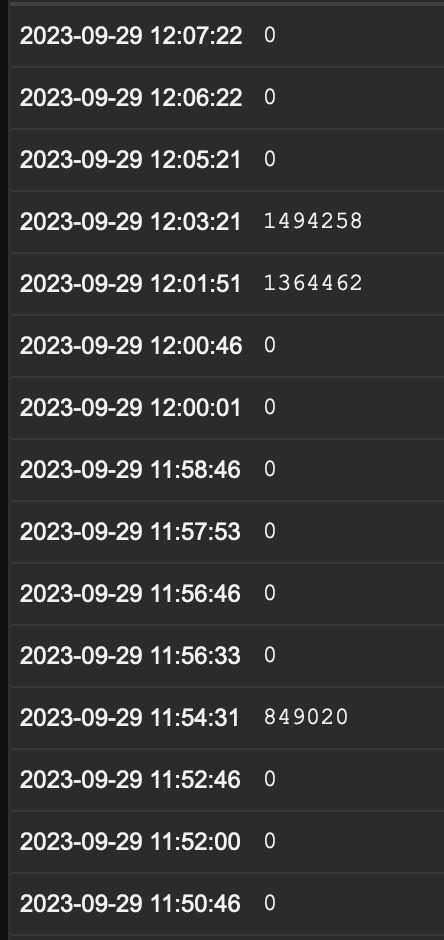
The same OID without change per second.
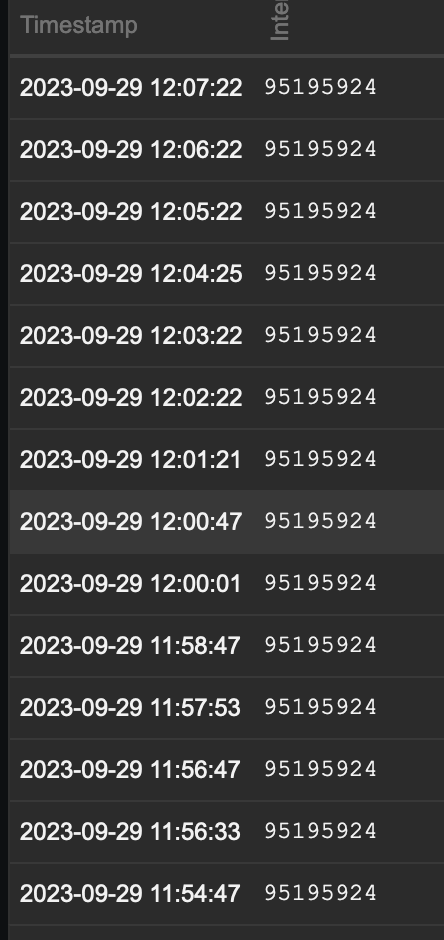
|
|
What version of Zabbix server is it ? Maybe it is possible to increase log level for preprocessing worker and attach it ? That's quite unexpected that missing value affects delta calculation. Are raw results without any preprocessing ?
zabbix_server -R log_level_increase="preprocessing worker"
|
|
We're on 6.0.19.
The server monitors over a thousand devices via 16 proxies so I'll have to see what I can do with regards to logging 
|
|
FYI: We'll run the server with extra logging on Monday. No production changes here on Friday afternoon. We like our weekends 
|
|
Preprocessing and collection is done through proxy and if only one interface is affected then maybe it's possible to create another proxy with this interface and checks. Unfortunately we cannot reproduce it locally for further investigation it might be required to patch proxy with additional debug information. It could be easier to investigate the issue if it's isolated.
|
|
Ah, that's good to know. But this affects many devices, not just one, although it tends to be the devices with smaller CPUs.
Either way, we'll gather the logs for you on Monday!
|
|
Thanks, if proxy is unpatched then it's better to increase log level for poller on proxy and then we can find time in log and compare it to log records for that time.
|
|
Hi,
This took a bit longer than expected. I now have a 500+ MB log file that looks somewhat cryptic. Anything you want me to look for?
|
|
If you could please grep for the time where there where missing entries and perhaps messages containing "snmp_sess_synch_response"
|
|
zabbix:/home/zabbix$ grep snmp_sess_synch_response log/20231003-zabbix02-hsnc01_proxy_log-preprocessing-worker.log
zabbix:/home/zabbix$
Nothing. This is the log form the proxy.
|
|
Updated documentation:
- SNMP agent: 7.0, 7.2, 7.4, 8.0 (added information on how to handle false spikes).
|
Generated at Mon Jun 08 04:02:47 EEST 2026 using Jira 10.3.18#10030018-sha1:5642e4ad348b6c2a83ebdba689d04763a2393cab.
 SNMP_bandwith_spike.png