[ZBX-21409] ODBC pollers get stuck Created: 2022 Jul 28  Updated: 2023 Jul 19  Resolved: 2023 Jul 19

Status: Closed
Project: ZABBIX BUGS AND ISSUES
Component/s: None
Affects Version/s: None
Fix Version/s: None

Type: Problem report Priority: Trivial
Reporter: Leonardo Savoini Assignee: Unassigned
Resolution: Commercial support required Votes: 0
Labels: None
Remaining Estimate: Not Specified
Time Spent: Not Specified
Original Estimate: Not Specified

Attachments: File ZBX-21409-1.trace     File ZBX-21409.locks     File ZBX-21409.lsof     File ZBX-21409.trace     PNG File image_20512.png     PNG File zabbix odbc issue.png    

 Description   

We have hundreds of queries (mostly SELECTs and some are calls to a Store procedure) to several MS SQL servers. All VMs are hosted in Azure. We have a variety of Windows Server versions and MS SQL server versions (2008, 2012, 2016.. etc).
I got this issue since Zabbix 5.0 as far I remember (now running Zabbix 6.0 still happening), and I'm mostly certain that the ODBC poller get stuck when is doing the query and simultaneously the vm or the database is down/unreachable.

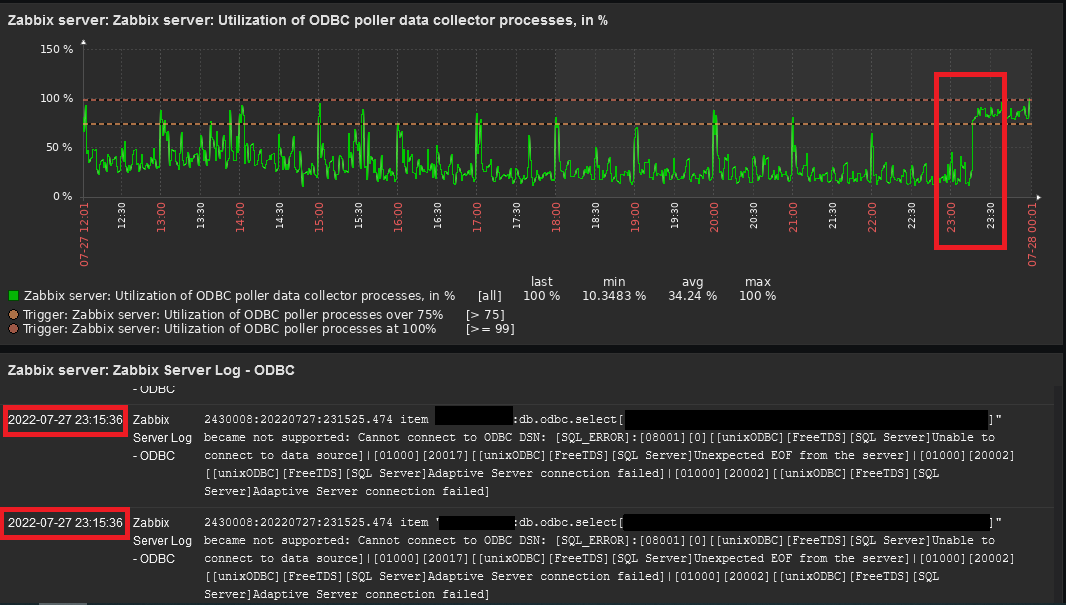
I have this evidence, were you can see that at the exact time of the error, the utilization jumps to more than 75%.


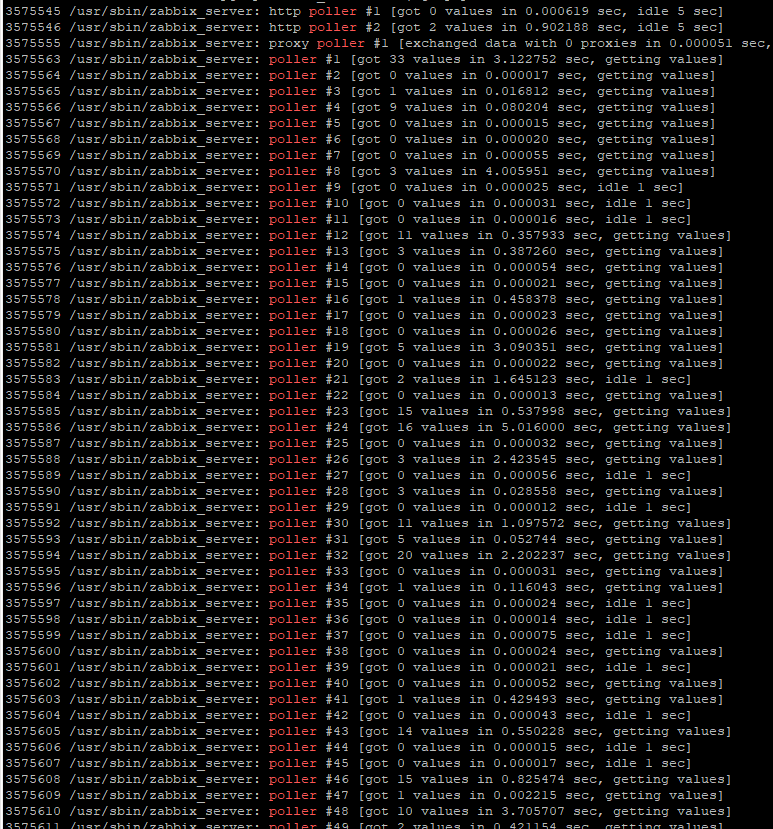
If you check each poller, you'll notice that for example says "got # values in ## sec, getting values", and if you come back, even a day later, to check again, the same pollers still have the same value. It just stay in that state, like is waiting forever to get a value or something.
In this image, I used 100 pollers (normally I only use 10 and is more than enough).

This often occurs when there is an issue or update in Azure and many servers get restarted. All other pollers work normally.

I have no way to debug what the poller is doing (yes, I tried set logs to debug and nothing is out of normal), or reset an individual poller. And therefore I have to restart the zabbix server service.

I use FreeTDS, with default values, and I don't remember this happening in Zabbix 4.0.

I don't know if you can find and fix this issue, but maybe at least add a poller health check and see if it is responding to get new values.

Thanks in advance, and sorry if I can't provide more or exact evidence to reproduce, this is something I'm still trying find a solution for more than a year now.


 Comments   
Comment by Alexey Pustovalov [ 2022 Aug 01 ]

Could you make a dump using strace:

strace -s 256 -tt -p <PID of stuck ODBC poller> -o /tmp/ZBX-21409.trace

A few minutes is enough.

Comment by Leonardo Savoini [ 2022 Aug 01 ]

ZBX-21409.trace

At the time of this dump, 7 of 10 pollers are "stuck". And none of SQL servers are down and without issues.

I took a couple of samples and have the same info "connection timed out".

Comment by Alexey Pustovalov [ 2022 Aug 01 ]

Thank you! please show us "lsof -p <PID of the same process like you took strace>".

Comment by Leonardo Savoini [ 2022 Aug 03 ]

Sorry, by the time I saw your comment, I had to restart the service because all pollers got "stuck" and I got a lot of false positive alerts. If you need it to be "stuck" we have to wait until it happens again.
Let me know.

Comment by Alexey Pustovalov [ 2022 Aug 03 ]

Yes, please! Also it would be great if you can share with lsof information about:

zabbix_server -R diaginfo=locks

Anyway, did you try official MSSQL driver from Microsoft?

Comment by Leonardo Savoini [ 2022 Aug 18 ]

Ok, I uploaded the 3 files, each containing the information you needed.

Currently I only have 1 "stuck" poller.

ZBX-21409.locks
ZBX-21409.lsof
ZBX-21409-1.trace

Comment by Vladislavs Sokurenko [ 2022 Aug 18 ]

It's highly likely that it hangs inside driver library, please try upgrading it or making sure that same library version is used as the one that worked before with 4.0

Comment by Alexey Pustovalov [ 2022 Aug 18 ]

Also, maybe you can try official MSSQL driver from Microsoft? Looks like the problem in freeTDS implementation.

Comment by Leonardo Savoini [ 2022 Aug 18 ]

FreeTDS version is the same when we had 4.0. There is no new versions to upgrade.
I'm trying to use official driver, but it isn't working. Using sqlcmd from the console, I can connect, but at the Zabbix frontend the error is: TCP Provider: Error code 0x2746]|[08001][10054][[unixODBC][Microsoft][ODBC Driver 18 for SQL Server]Client unable to establish connection]. I also tried ODBC Driver 17.
I followed some workaround about an openssl issue (I don't know why it is related, if connection doesn't need TLS). But no luck so far. I'm using Ubuntu 20.04.

Additionally, I did:

sudo lsof -p 221454 -i

Output:

zabbix_se  221454          zabbix   18u     IPv4          498992163      0t0       TCP x.x.x.x:46322->y,y,y,y:42345 (CLOSE_WAIT)

Then I used this source port 46322 as a filter in tcpdump,

17:10:50.776061 IP x.x.x.x.46322 > y,y,y,y.42345: Flags [.], ack 152495331, win 502, options [nop,nop,TS val 2677219822 ecr 1238967986,nop,nop,sack 1 {0:1}], length 0
17:11:20.838964 IP x.x.x.x.46322 > y,y,y,y.42345: Flags [.], ack 1, win 502, options [nop,nop,TS val 2677249885 ecr 1238967986,nop,nop,sack 1 {0:1}], length 0
17:11:50.839017 IP x.x.x.x.46322 > y,y,y,y.42345: Flags [.], ack 1, win 502, options [nop,nop,TS val 2677279885 ecr 1238967986,nop,nop,sack 1 {0:1}], length 0
17:12:20.934753 IP x.x.x.x.46322 > y,y,y,y.42345: Flags [.], ack 1, win 502, options [nop,nop,TS val 2677309981 ecr 1238967986,nop,nop,sack 1 {0:1}], length 0

You can see it's forever trying to connect with the same source port (normally is dynamic), in a 30 seconds interval. I check all .conf files and I did not find any 30 seconds timeout. Zabbix is 4 seconds, Freetds is 10 seconds. And of course, other pollers are connecting to the same server without issues.
Still, my doubt is: why if I restart Zabbix service "systemctl restart zabbix-server" it returns to normal operation?

Comment by Alexey Pustovalov [ 2022 Aug 18 ]

what mssql version did you test with official driver? Zabbix just pass request to odbc driver, then it trying to connect, Zabbix waiting

Comment by Leonardo Savoini [ 2022 Aug 19 ]

Microsoft SQL Server 2016 (SP1-CU15-GDR) (KB4505221) - 13.0.4604.0 (X64)
Standard Edition (64-bit) on Windows Server 2012 R2 Datacenter 6.3 <X64> (Build 9600: ) (Hypervisor)

Comment by Alexey Pustovalov [ 2022 Aug 19 ]

Please check, maybe some feature is not available: https://docs.microsoft.com/en-us/sql/connect/driver-feature-matrix?view=sql-server-ver16#table2. Do you use AD auth?

Comment by Leonardo Savoini [ 2022 Aug 19 ]

No, we don't use AD auth.

Comment by Alexey Pustovalov [ 2022 Aug 19 ]

could you check this thread: https://stackoverflow.com/questions/57265913/error-tcp-provider-error-code-0x2746-during-the-sql-setup-in-linux-through-te/57343207#57343207

Comment by Leonardo Savoini [ 2022 Aug 31 ]

I'm still unable to make it work. I should stick with Freetds driver.

Generated at Thu May 21 19:44:09 EEST 2026 using Jira 10.3.18#10030018-sha1:5642e4ad348b6c2a83ebdba689d04763a2393cab.