[ZBX-22657] Unavailability of new hosts Created: 2023 Apr 12  Updated: 2023 Jun 02  Resolved: 2023 Jun 02

Status: Closed
Project: ZABBIX BUGS AND ISSUES
Component/s: Server (S)
Affects Version/s: 6.4.1
Fix Version/s: None

Type: Problem report Priority: Trivial
Reporter: Konstantin Assignee: Aigars Kadikis
Resolution: Cannot Reproduce Votes: 0
Labels: None
Remaining Estimate: Not Specified
Time Spent: Not Specified
Original Estimate: Not Specified
Environment:

Rocky Linux 9.1, postgresql 15.2


Attachments: PNG File create-host-search-hosts.png     PNG File host.png     PNG File search_by_ip.png     PNG File search_by_name.png    

 Description   

Hi! In the new zabbix installation, we encountered the following problem:

We create a new host with the Agent interface, add templates, include them in groups. After the addition, the host is unavailable.

I see similar errors in the logs:

  1892:20230410:171316.109 cannot send list of active checks to "10.0.0.98": host [co-forum] not found
  1889:20230410:171516.137 cannot send list of active checks to "10.0.0.98": host [co-forum] not found
  1892:20230410:171716.160 cannot send list of active checks to "10.0.0.98": host [co-forum] not found
  1886:20230410:171916.188 cannot send list of active checks to "10.0.0.98": host [co-forum] not found
  1890:20230410:172116.205 cannot send list of active checks to "10.0.0.98": host [co-forum] not found

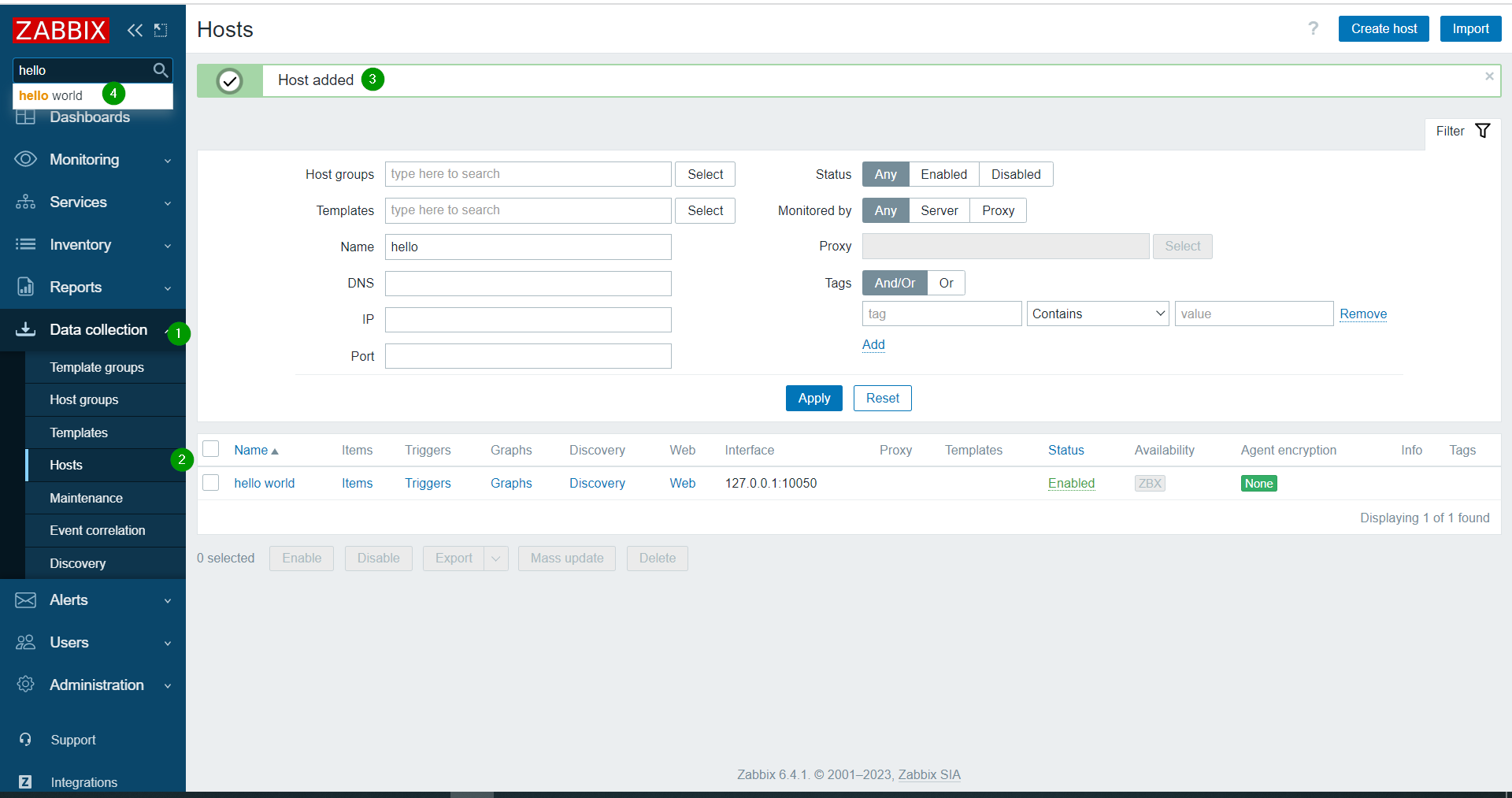
Also, a new host cannot be found in the search bar by name on the Hosts page, but it can be found by ip.

The host becomes available only after restarting the service:

systemctl restart zabbix-server.service

After restarting, there are no errors in the logs and the search by name works correctly.


Please specify if you need to provide additional information?


 Comments   
Comment by Aigars Kadikis [ 2023 Apr 13 ]

Thank you for contacting us.
I'm unable to reproduce the first part of the problem - search field not working.
Mind to try the same sequence as in screenshot - create host and immediately search for it?

Regarding the second part - what is the template name you exactly linked? Attach a screenshot of configuration page where we can see a Host name, Visible name, IP address, Attached templates, Host groups.

Comment by Konstantin [ 2023 Apr 13 ]

Screenshots.

Comment by Aigars Kadikis [ 2023 Apr 14 ]

Thank you for details. I'm trying to reproduce with 6.4.1, even with a same host name and same templates, but the host immediately shows up under "Monitoring" => "Hosts". 

So far, cannot explain the behaviour.

What is CacheUpdateFrequency configured in "zabbix_server.conf"? Could you do 3 more tests:

  • Create the host by using letter characters only. Eliminate the usage of '-'.
  • If you never link the templates, does the host show up after the restarting service?
  • Under "Monitoring" => "Hosts" click "Reset" button. Maybe the record shows up when the host is having a problem (your screenshot is having a problem per host).
Comment by Konstantin [ 2023 Apr 14 ]

Deleted the host and added it again under the name forum. I didn't attach templates. the host is unavailable. in the search, you can find only by IP.
CacheUpdateFrequency is not set.

Comment by Aigars Kadikis [ 2023 Apr 17 ]

The PostgreSQL 15.2 was installed by using https://www.postgresql.org/download/linux/redhat/

I could not reproduce the issue when using just exactly Rocky Linux 9.1 and PostgreSQL 15.2. I have used these instructions:
https://www.zabbix.com/download?zabbix=6.4&os_distribution=rocky_linux&os_version=9&components=server_frontend_agent&db=pgsql&ws=nginx

While setting up PostgreSQL, the vanilla Rocky 9 was putting an error message on screen "Failed to set locale, defaulting to C.UTF-8". I decided to not continue and fix it by using: https://www.tecmint.com/fix-failed-to-set-locale-defaulting-to-c-utf-8-in-centos/

Try to reproduce your problem with Zabbix appliance https://cdn.zabbix.com/zabbix/appliances/stable/6.4/6.4.1/zabbix_appliance-6.4.1-ovf.tar.gz .

Generated at Sat Apr 18 13:25:26 EEST 2026 using Jira 10.3.18#10030018-sha1:5642e4ad348b6c2a83ebdba689d04763a2393cab.