|
Steps to reproduce:
- Do all necessary steps for Azure resources monitoring
- Wait, while MS SQL DB will be discovered
Result:
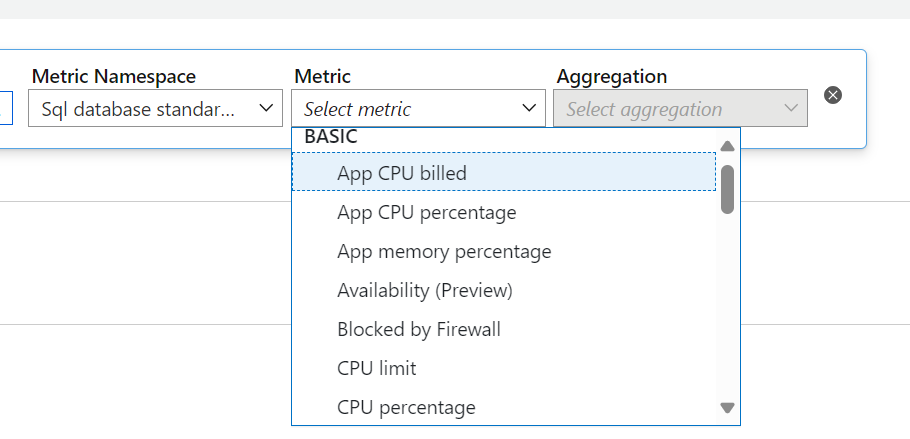
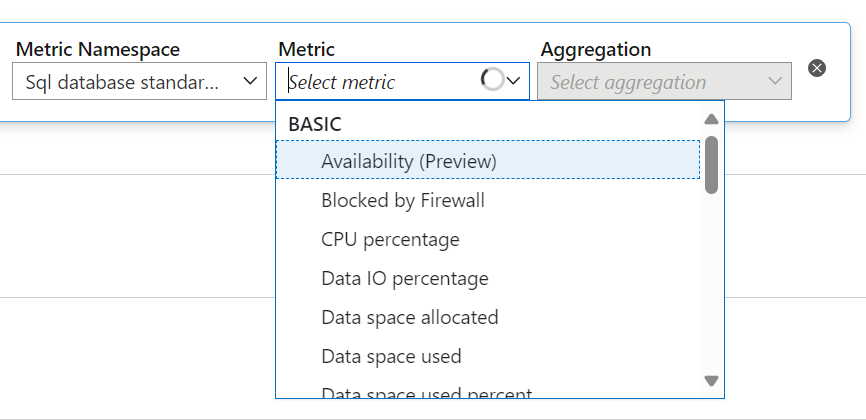
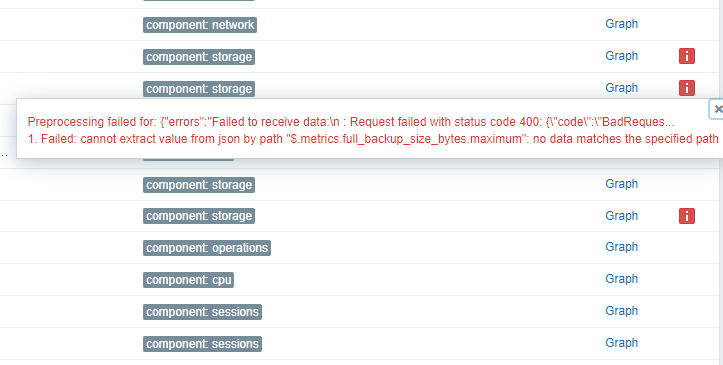
After discovery you will have a dozen of errors, related to "metric not found" and etc.
If you change JS script (exclude some of the metrics, for example) it will solve the problem (at least, part of them)
Expected:
{"errors":"Failed to receive data:\ncpu_percent,physical_data_read_percent,log_write_percent,storage,connection_successful,connection_failed,blocked_by_firewall,deadlock,storage_percent,xtp_storage_percent,workers_percent,sessions_percent,sessions_count,cpu_limit,cpu_used,sqlserver_process_core_percent,sqlserver_process_memory_percent,tempdb_data_size,tempdb_log_size,tempdb_log_used_percent : Request failed with status code 400: {\"error\":{\"additionalInfo\":[{\"type\":\"string\",\"info\":\"TraceId=
{060933e6-067b-44ef-8d18-f57a329c7191}
\"},{\"type\":\"string\",\"info\":\"ExceptionType=Microsoft.Online.Metrics.MetricsMP.Utilities.RPRequestFormatException\"}],\"code\":\"BadRequest\",\"message\":\"Failed to find metric configuration for provider: Microsoft.Sql, resource Type: servers/databases, metric: cpu_limit, Valid metrics: cpu_percent,physical_data_read_percent,log_write_percent,dtu_consumption_percent,storage,connection_successful,connection_failed,connection_failed_user_error,blocked_by_firewall,deadlock,storage_percent,xtp_storage_percent,workers_percent,sessions_percent,sessions_count,dtu_limit,dtu_used,sqlserver_process_core_percent,sqlserver_process_memory_percent,sql_instance_cpu_percent,sql_instance_memory_percent,tempdb_data_size,tempdb_log_size,tempdb_log_used_percent,allocated_data_storage,ledger_digest_upload_success,ledger_digest_upload_failed\"}}\nfull_backup_size_bytes,diff_backup_size_bytes,log_backup_size_bytes : Request failed with status code 400: {\"error\":{\"additionalInfo\":[{\"type\":\"string\",\"info\":\"TraceId=
{a4d44fb2-b52a-4e9c-a555-9605bc6c4b2a}
\"},{\"type\":\"string\",\"info\":\"ExceptionType=Microsoft.Online.Metrics.MetricsMP.Utilities.RPRequestFormatException\"}],\"code\":\"BadRequest\",\"message\":\"Failed to find metric configuration for provider: Microsoft.Sql, resource Type: servers/databases, metric: full_backup_size_bytes, Valid metrics: cpu_percent,physical_data_read_percent,log_write_percent,dtu_consumption_percent,storage,connection_successful,connection_failed,connection_failed_user_error,blocked_by_firewall,deadlock,storage_percent,xtp_storage_percent,workers_percent,sessions_percent,sessions_count,dtu_limit,dtu_used,sqlserver_process_core_percent,sqlserver_process_memory_percent,sql_instance_cpu_percent,sql_instance_memory_percent,tempdb_data_size,tempdb_log_size,tempdb_log_used_percent,allocated_data_storage,ledger_digest_upload_success,ledger_digest_upload_failed\"}}","metrics":{"allocated_data_storage":{"timeStamp":"2023-09-11T11:14:00Z","average":50331648}},"health":{"availabilityState":"Available","title":"Available","summary":"There aren't any known Azure platform problems affecting this SQL database or SQL data warehouse.","reasonType":"","category":"Not Applicable","context":"Not Applicable","occuredTime":"2023-08-12T00:00:00Z","reasonChronicity":"Persistent","reportedTime":"2023-09-11T11:15:02.6321282Z"}}
|
 image-2023-09-11-14-36-42-407.png
 Team INT