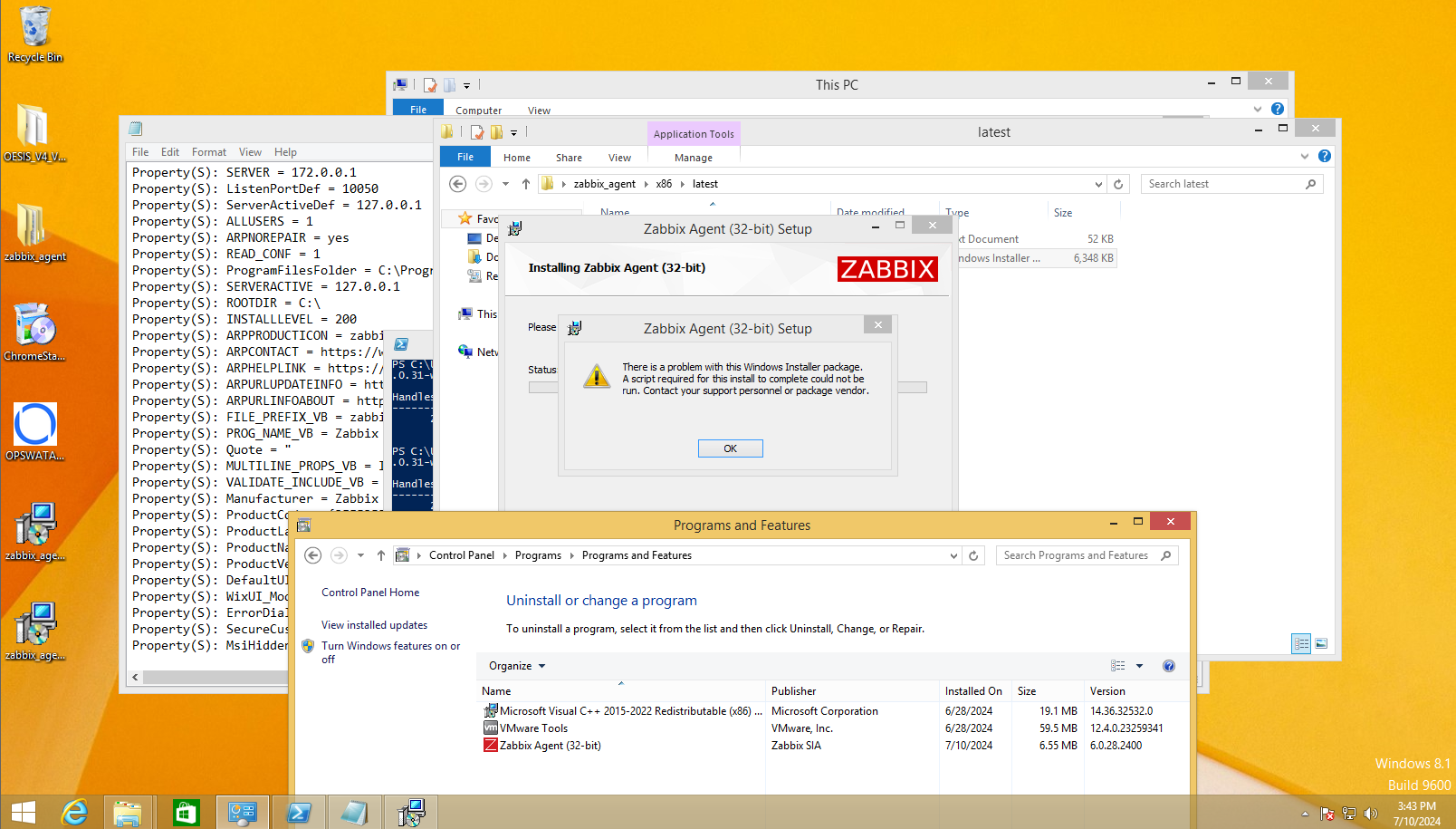
[ZBX-24827] Windows 8 | Cannot update Zabbix Agent on Windows 8 Created: 2024 Jul 10  Updated: 2024 Oct 18  Resolved: 2024 Aug 13

Status: Closed
Project: ZABBIX BUGS AND ISSUES
Component/s: Agent (G), Packages (C)
Affects Version/s: 6.0.31, 6.4.16, 7.0.0
Fix Version/s: 6.0.33rc1, 7.0.3rc1, 7.2.0alpha1

Type: Problem report Priority: Major
Reporter: Daniel Dao Assignee: Michael Veksler
Resolution: Fixed Votes: 0
Labels: Windows, agent, eol, outdated
Remaining Estimate: 0h
Time Spent: 25h
Original Estimate: 8h
Environment:

Windows 8.1


Attachments: PNG File image-2024-07-10-16-05-50-029.png     PNG File image-2024-07-31-11-22-41-841.png     PNG File image-2024-08-01-09-24-22-936.png     PNG File image-2024-08-01-09-24-59-198.png     PNG File image-2024-08-07-10-00-04-056.png     Text File log 1.txt     Text File log 2.txt     Text File log 3.txt     Text File log_win-2008.txt     PNG File screenshot-1.png     File zabbix_agent-6.0.32-x64.msi     File zabbix_agent-6.0.32-x86.msi     File zabbix_agent-6.0.33-x64.msi     File zabbix_agent-6.0.33-x86.msi     File zabbix_agent-7.0.0-x64.msi     File zabbix_agent-7.0.0-x86.msi     File zabbix_agent-7.0.1-x64.msi     File zabbix_agent-7.0.1-x86.msi    
Team: Team B
Sprint: S24-W28/29, S24-W30/31, S24-W32/33
Story Points: 1

 Description   

Steps to reproduce:{}

  1. On Windows 8.1, Installed Zabbix Agent base version 6.0.28.2400
  2. Then double-click the latest installer version 6.0.31 to update Zabbix Agent
  3. The installer then shows error


Result:

Expected:
Do not show error, installation is successful

*Note that: The issue happens to latest version 6.0.31 because when I update Zabbix agent from 6.0.28 to 6.0.30, it still works well


 Comments   
Comment by Daniel Dao [ 2024 Jul 10 ]

The issue only happens on Windows 8 -32 bit

The installer link: https://cdn.zabbix.com/zabbix/binaries/stable/6.0/6.0.31/zabbix_agent-6.0.31-windows-i386-openssl.msi

Comment by Edgar Akhmetshin [ 2024 Jul 11 ]

Hello DanielDao

Please provide installation log (log.txt).

SET INSTALLFOLDER=<path to install folder>

msiexec /l*v log.txt /i <file to install.exe> /qn^
 LOGTYPE=file^
 LOGFILE="%INSTALLFOLDER%\za.log"^
 SERVER=x.y.z.w^
 LISTENPORT=12345^
 SERVERACTIVE=::1^
 HOSTNAME=myHost^
 ENABLEPATH=1^
 INSTALLFOLDER="%INSTALLFOLDER%"^
 SKIP=fw

Regards,
Edgar

Comment by Daniel Dao [ 2024 Jul 15 ]

Hi edgar.akhmetshin,

Here is the log: log 1.txt


Best regards,

Daniel

Comment by Michael Veksler [ 2024 Jul 16 ]

Hi @Daniel Dao,

Be so kind as to test zabbix_agent-6.0.33-x64.msi  dev version of msi

Comment by Daniel Dao [ 2024 Jul 17 ]

Hi MVekslers,

Actually the issue happens on Windows 8 - 32-bit, so your installer 64-bit will not work out on this OS architecture. Can you please give me the 32-bit installer?


Note that, I tested with Zabbix agent v6.0.32 and the bug still happens, here is the log: log 2.txt


Thanks and Best regards,

Daniel

CC: edgar.akhmetshin 

Comment by Michael Veksler [ 2024 Jul 18 ]

Hi @Daniel Dao,

Be so kind as to test zabbix_agent-6.0.33-x86.msi  dev version of msi

(FYI: win8 does not support access to DelayedAutostart via wmi - the root of problem)

Comment by Daniel Dao [ 2024 Jul 19 ]

Hi MVekslers,

I tested in my local machine and such dev installer is now working on Windows 8 - 32 bit. Here is the log: log 3.txt

Thanks a lot for your work!

Besides, Can I get the release date of this version?


Best regards,

Daniel

Comment by Michael Veksler [ 2024 Jul 19 ]

Hi @Daniel Dao,
I think this month

Generated at Sun Apr 05 08:29:25 EEST 2026 using Jira 10.3.18#10030018-sha1:5642e4ad348b6c2a83ebdba689d04763a2393cab.