[ZBX-26117] Proxmox Network VirtIO Not Handled Properly Created: 2025 Feb 28  Updated: 2025 May 29  Resolved: 2025 May 29

Status: Closed
Project: ZABBIX BUGS AND ISSUES
Component/s: None
Affects Version/s: 7.0.10
Fix Version/s: None

Type: Incident report Priority: Trivial
Reporter: Steven Petrillo Assignee: Zabbix Support Team
Resolution: Won't fix Votes: 0
Labels: None
Remaining Estimate: Not Specified
Time Spent: Not Specified
Original Estimate: Not Specified
Environment:

Ubuntu 24.04.2


Attachments: PNG File Screenshot 2025-02-28 111540.png     PNG File Screenshot 2025-02-28 141438.png     PNG File Screenshot 2025-03-25 103202.png     PNG File image-2025-05-28-23-08-17-939.png     PNG File image-2025-05-28-23-08-17-981.png    

 Description   

Steps to reproduce:

  1. By default network support for VMs under Proxmox use VirtIO as the model.

Result:

  1. When using the Linux by Zabbix agent active the speed of the network interface is shown as an error, showing -1000000
  2. Changing the network model from VirtIO to VMXNET3 solves the problem.

Expected:

  1. When using the Linux by Zabbix agent active the speed of The network interface is shown as an error, showing -1000000


 Comments   
Comment by Tomasz Grzechulski [ 2025 Mar 12 ]

Hello Steven,

Which version of Proxmox VE is used? This would be helpful with reproducing this issue,

Comment by Steven Petrillo [ 2025 Mar 12 ]

Sorry...I am using Proxmox 8.3.4.

Comment by Tomasz Grzechulski [ 2025 Mar 13 ]

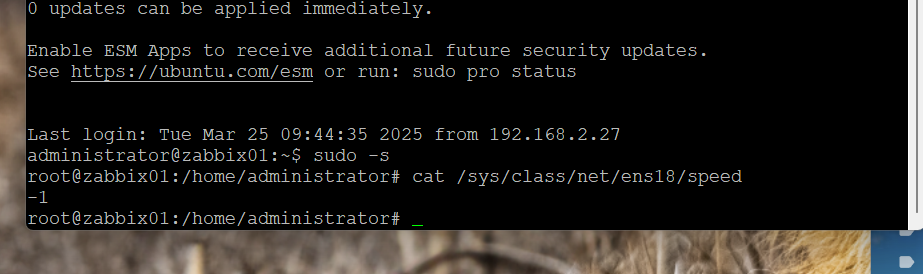
could you please provide output of:

cat /sys/class/net/ens18/speed 

from this ubuntu system?
since its sys file, you might need to run it from root level or use "sudo"
before running this command, change interface type to "VitrlO"

Comment by Steven Petrillo [ 2025 Mar 25 ]

Here you go...

Comment by Piotr Zakrzewski [ 2025 May 27 ]

Hey Steven,

In proxmox by default there is no speed limit on the VirtIO network interface. The speed of that interface can be even 50Gb/s if you've got enough RAM and your hypervisor host have the supported NIC. Therefore i don't think there's bug anywhere here.

When i run my VM's on proxmox, and have the VirtIO NIC model selected, it shows it's speed to around 10Gbits. So it seems to me everything's as its supposed to be.

If you need to set the limit on the interface to show some value like 1Gb/s, just pick a different NIC model in VM settings, or set the limit in the "Rate limit".

Comment by Steven Petrillo [ 2025 May 27 ]

So when you look at your information it shows -10000000? Dont you think that is just crazy to show? Why cant the software interpret that and show 10Gb/s? This may not be a bug but its certainly not something you should have your clients try to decipher.

Comment by Piotr Zakrzewski [ 2025 May 29 ]

Indeed, in all of my VM's with "VirtIO (paravirtualized)" interface it also shows an error in Zabbix.

But that's not the Zabbix fault, the `cat` of network interface speed with response '-1' simply means "Unsupported".

root@imaginary$ cat /sys/class/net/ens18/speed
-1 

It's not the Zabbix fault that it can't understand the value - if the OS also don't understand what's going on.
The reason why it's working that way is because Linux kernel can't query the actual speed, because it's a virtual interface - there's no real physical layer or negotiation happening.

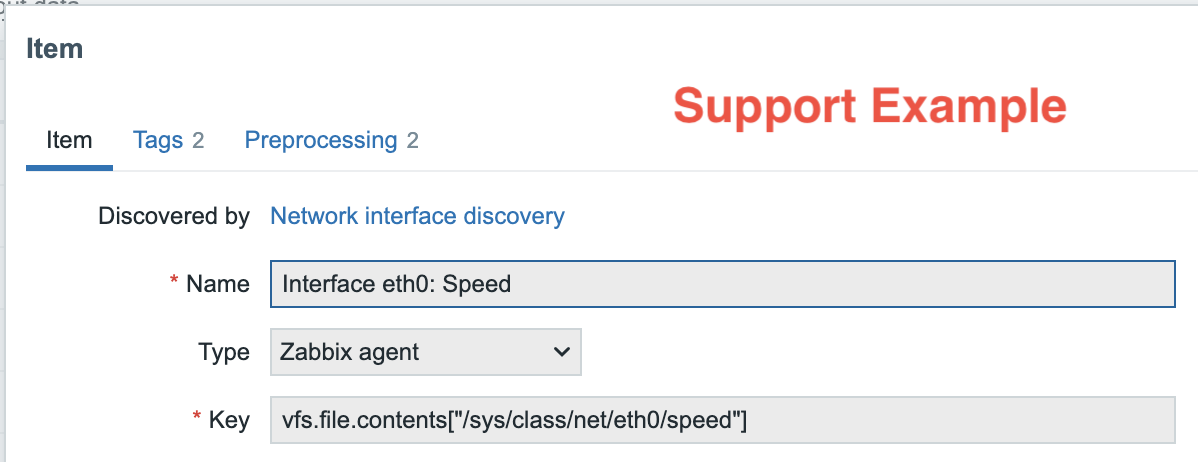
And Zabbix is simply doing same thing which that `cat` does.
Check below:
 

Also even if we'd multiply the '-1000000' by -'1' to get '1000000', that will be '1000000 bps', which is merely 1Mbps after unit conversion.

I mean, cosmetically you can fix that by doing some somersaults in preprocessing, but it won't show you the real IF speed.

So I suggest to either choose any other Interface type in Proxmox, or well - you could also ask ChatGPT how to 'workaround' that, but every 'workaround' is pure cosmetics, trust me (or not).

Comment by Piotr Zakrzewski [ 2025 May 29 ]

Don't mind me, I'm closing that issue, because.. there's just no issue, and I also trust that my explanation above is just enough.

BR

Generated at Tue Apr 21 20:12:00 EEST 2026 using Jira 10.3.18#10030018-sha1:5642e4ad348b6c2a83ebdba689d04763a2393cab.