Network interface in/out doesn't support modes in Windows

XMLWordPrintable

    • Type: Problem report
    • Resolution: Cannot Reproduce
    • Priority: Major
    • None
    • Affects Version/s: 3.4.7
    • Component/s: Agent (G)
    • Environment:
      Using Zabbix 3.4.3 server with Zabbix Agent 3.4.1 on Windows Server 2012 R2 or Windows Server 2016.

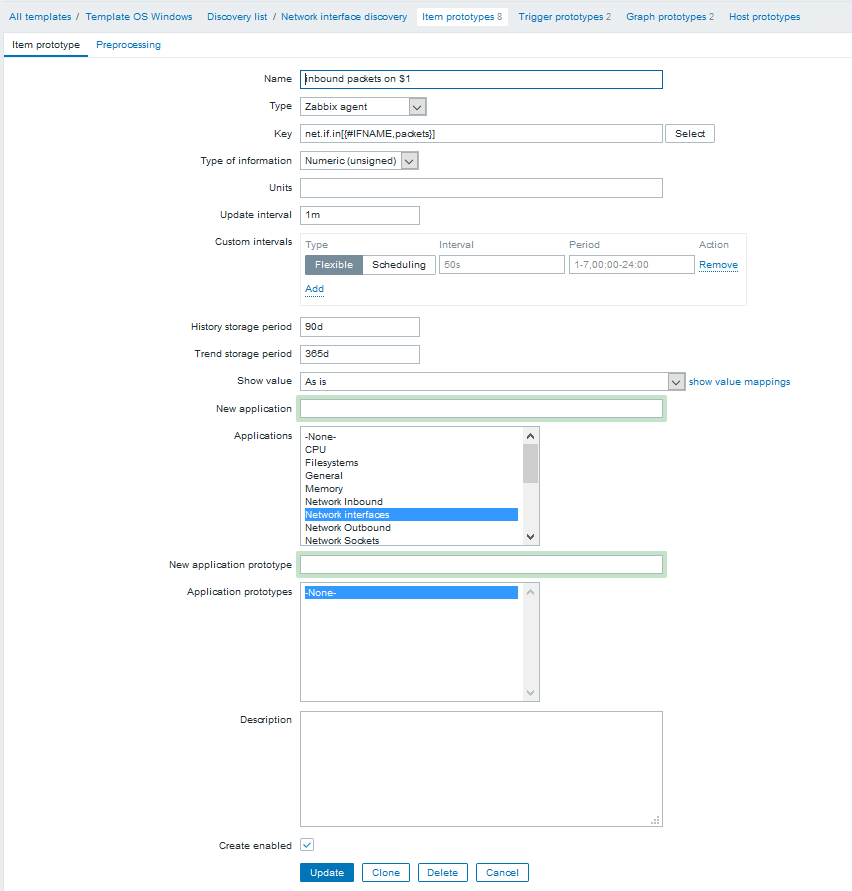
      The build in Zabbix "Template OS Windows" has network discovery setup.
      The monitoring of the network interface bandwidth works as expected. (Which is the default mode for net.if.in / net.if.out).

      The custom mode's which are also set in the default template do not work:
      net.if.out[

      {#IFNAME,packets}]
      net.if.out[{#IFNAME,dropped}]
      net.if.in[{#IFNAME,packets}

      ]
      net.if.in[

      {#IFNAME,dropped}

      ]

      Untested:
      net.if.in[

      {#IFNAME,errors}]
      net.if.out[{#IFNAME,errors}

      ]

      The items work correctly on the agent:
      zabbix_agentd.exe -t net.if.in"Intel(R) I210 Gigabit Network Connection #2,packets"

      Results in: net.if.inIntel(R) I210 Gigabit Network Connection #2,packets [u|37585412]
            Assignee:
            Unassigned
            Reporter:
            Gijs van der Velden
            Votes:
            0 Vote for this issue
            Watchers:
            1 Start watching this issue

              Created:
              Updated:
              Resolved: