-
Type:
Problem report
-
Resolution: Fixed
-
Priority:
 Trivial
-
Affects Version/s: 7.0.0alpha6
-
Component/s: Server (S)
-
Sprint 105 (Oct 2023), Sprint 106 (Nov 2023)
-
0.5
Steps to reproduce:
1) Create host with Zabbix agent interface.
2) Create 2 Zabbix Agent items with keys:
vfs.fs.size[/,free]
and
vfs.fs.size[/,total]
3) Create Calculated item.
4) Set parameters for Calculated items like:
Key - calculated_1
Type of information - Numeric (unsigned)
Formula - 100*last(//vfs.fs.size[/,free])/last(//vfs.fs.size[/,total])
5) Turn on server and agent. Wait some time to collect data.
6) Open created Calculated item and try to test item.
Result:
Error message appears.
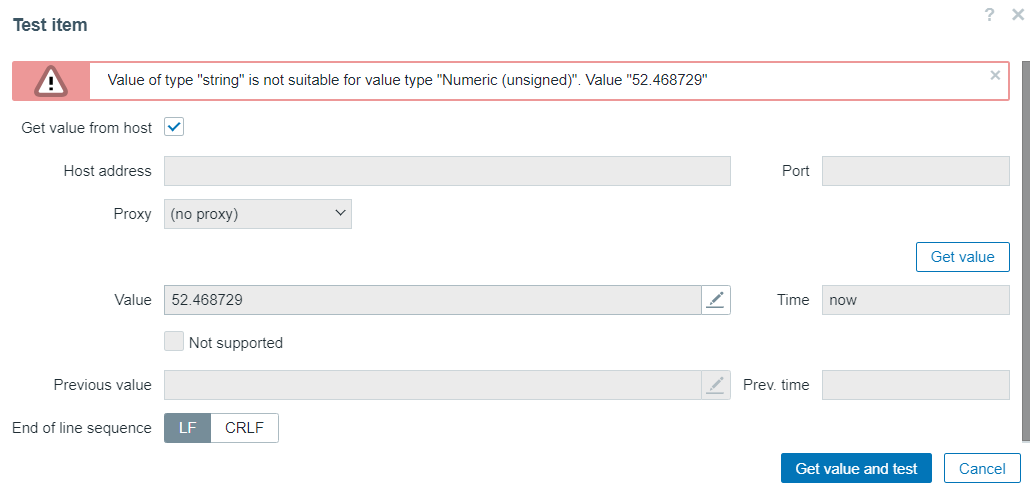
Expected:
Expected trimmed data (as received and displayed on Latest data page.)
No error message.
All others items type of information can be tested without any errors.
- causes
-
-

- Closed
-
- duplicates
-
ZBXNEXT-8813 Support for values in scientific notation for numeric unsigned data type
-

- Open
-

