-
Type:
Problem report
-
Resolution: Fixed
-
Priority:
 Trivial
-
Affects Version/s: 7.0.12rc1
-
Component/s: Tools (J)
-
None
-
Environment:Web service was tested on Linux and Windows
-
Prev.Sprint, S25-W24/25, S25-W26/27, S25-W28/29, S25-W30/31
-
2
This bug was discovered in Zabbix web service while working on ZBX-24850 in Zabbix agent 2.
Steps to reproduce:
- Configure PDF scheduled reports as usual.
- In Administration > Geneal > Other -> Frontend URL, configure a fronted URL containing IPv6 address. The correctness of the address may be checked by putting it to the browsers address bar. A public IP address may be used.
- Test the scheduled report.
Result:
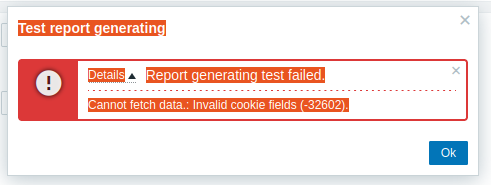
The report generation fails with the error message "Cannot fetch data.: Invalid cookie fields (-32602)." which is originated from Zabbix web service. See screenshot.
Expected:
Scheduled report is created and delivered by email. No errors are observed.
In ideal case, it should work with public and also link-local IP addresses Link local IPv6 addresses are not supported by URL standard.
- related to
-
-

- Closed
-


