-
Type:
Problem report
-
Resolution: Unresolved
-
Priority:
 Major
Major
-
None
-
Affects Version/s: 7.0.17, 7.4.1, 8.0.0alpha1
-
Component/s: Frontend (F)
-
Support backlog
Dear Zabbix Support Team,
I hope this email finds you well.
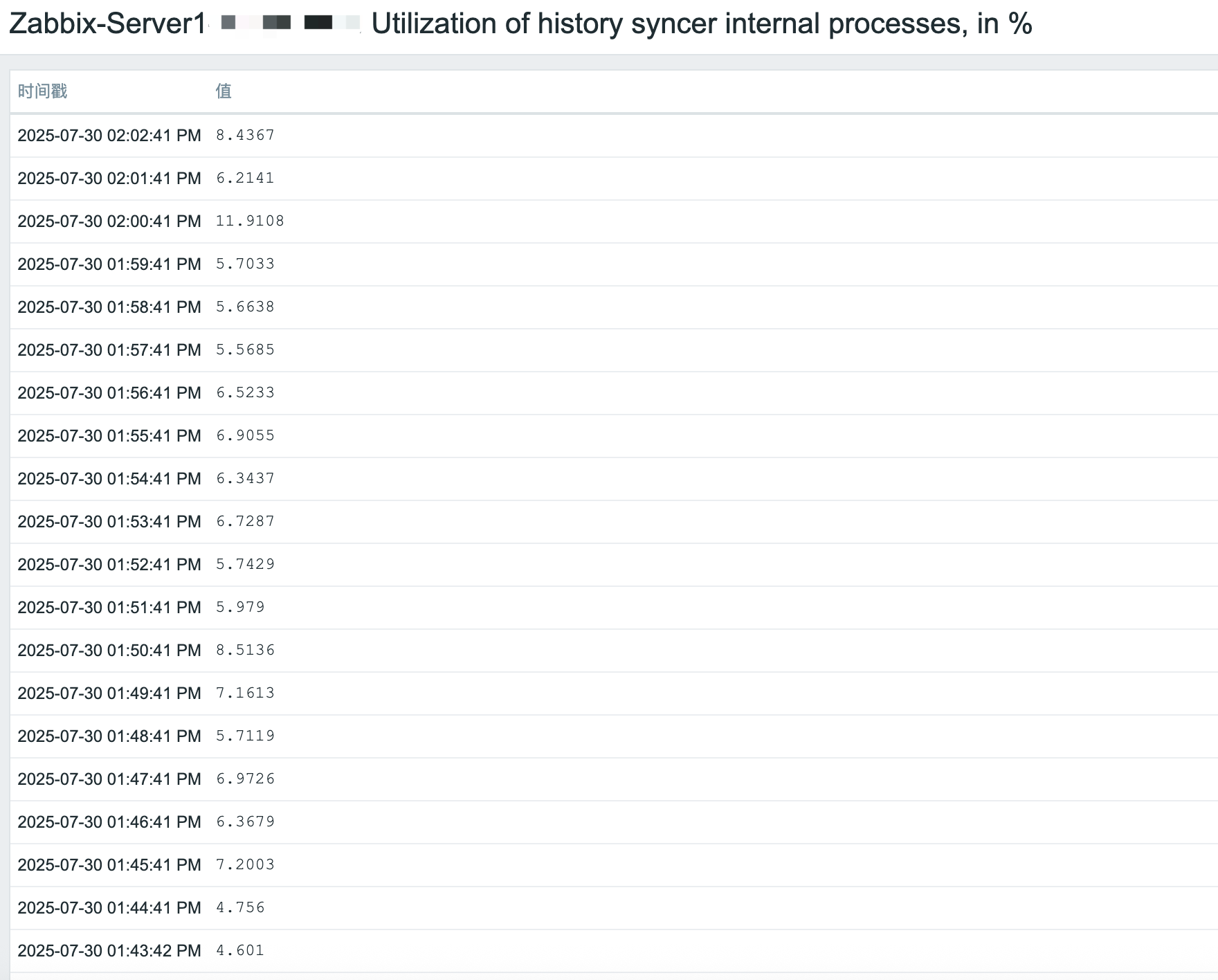
We have identified an unexpected behavior in Zabbix 7.0.17 related to time format display when the frontend language is set to zh_CN. This issue did not occur in versions 7.0.16 and earlier. Below are the detailed steps to reproduce the issue.
Steps to Reproduce
- Configuration Changes:
-
- Ensure the Zabbix frontend language is set to zh_CN (Simplified Chinese).
- Navigate to: Administration → Users → [Select User] → Language.
- Set language to zh_CN and save changes.
- Ensure the Zabbix frontend language is set to zh_CN (Simplified Chinese).
- Navigate to Screen Title:
-
- Go to any screen displaying time values (e.g., Monitoring → Dashboard, Latest Data, or Problem View).
- Observe Time Format:
-
- Check the format of time values (e.g., event timestamps, graph axes, or data tables).
Result (Observed in Zabbix 7.0.17)
- Time values are displayed in 12-hour format with AM/PM (e.g., 2:30 PM).
- See screenshot: [Attach screenshot showing 12-hour format].
Expected Behavior (Zabbix 7.0.16 and Earlier)
- Time values should follow the 24-hour format (e.g., 14:30).
- See screenshot: [Attach screenshot from 7.0.16 showing 24-hour format].
Questions
- Is this change intentional in Zabbix 7.0.17?
- If yes, is there a configuration option to force 24-hour format for zh_CN?
- If no, could this be a regression bug?
Please let us know if you need additional details (e.g., browser logs, system locale settings). We appreciate your prompt clarification.
Best regards,
Alex Wong