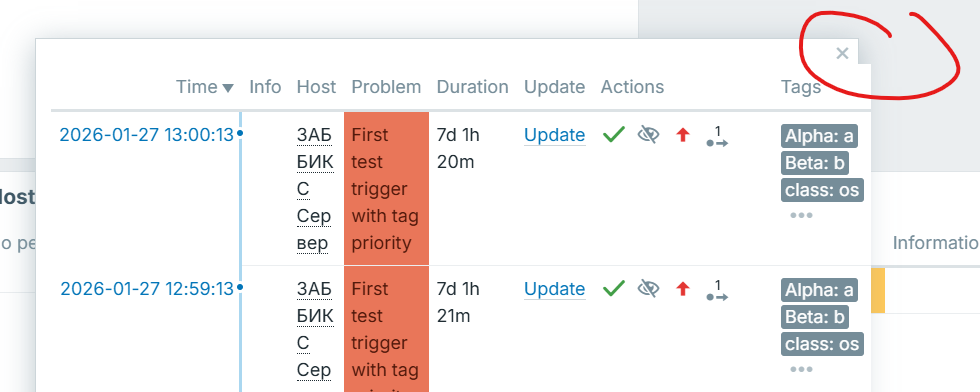
Broken layout of Problem severity issues list on small screen

XMLWordPrintable

    • Type: Problem report
    • Resolution: Unresolved
    • Priority: Trivial
    • 8.0.0alpha2 (master)
    • Affects Version/s: 8.0.0alpha1, 8.0.0alpha2 (master)
    • Component/s: Frontend (F)
    • Sprint candidates
    • 1

      Preconditions:

      • There are problems with different severities.
      • Small laptop screen.

      Steps to reproduce:

      1. Create a Problem Severity widget.
      2. Save the dashboard.
      3. Open the dashboard on a small laptop screen.
      4. Click on problems with different severities.

      Result:
      The close (X) button is visually shifted to the left.
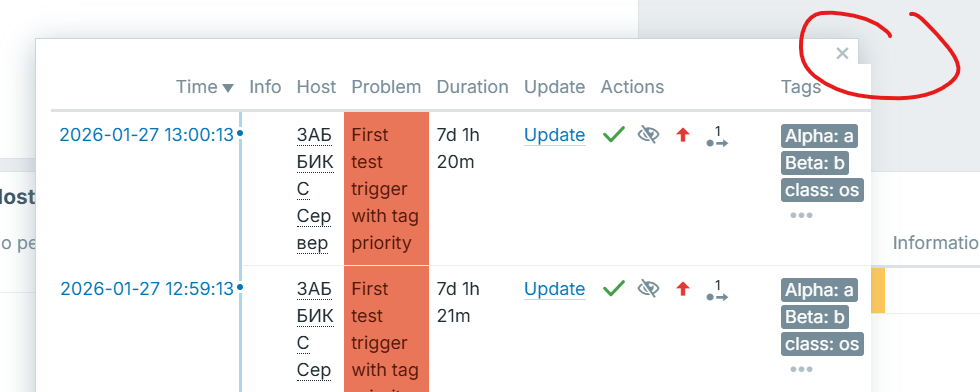
      Expected:
      Layout should remain aligned and responsive on small screen sizes.

        1. image (3).png
          73 kB
          Juliana Iljina
        2. Recording 2026-02-03 141810.mp4
          4.50 MB
          Juliana Iljina

            Assignee:
            Dmitrijs Fofanovs
            Reporter:
            Juliana Iljina
            Team A
            Votes:
            0 Vote for this issue
            Watchers:
            3 Start watching this issue

              Created:
              Updated: