-
Type:
Problem report
-
Resolution: Unresolved
-
Priority:
 Trivial
-
None
-
Affects Version/s: None
-
Component/s: Agent (G)
-
None
-
Environment:Windows Server 2022 21H2
Steps to reproduce:
- Have a folder where some files have open handles and some do not.
- Use vfs.dir.size via Zabbix Agent to get folder size (mode apparent/disk)
- Compare with folder size via folder Properties or data from WMI (CIM_DataFile)
- Folder size via vfs.dir.size and size seen in Properties and WMI doesn't match
Result:
Folder size via vfs.dir.size and size seen in Properties and via WMI doesn't match while there are open file handles that do not allow Read.
Expected:
Folder size via vfs.dir.size and size seen in Properties and WMI should match regardless of open file handles.
Addiotional notes:
I have tested getting directory via WMI (wmi.getall["root\cimv2","SELECT FileSize FROM CIM_DataFile WHERE Drive = 'W:' AND Name LIKE '%\\<directory name>\\%'"]) and then using JSONPath "$..FileSize.sum()" to sum the size of files. and via WMI, the result is similar to what's seen in folder Properties.
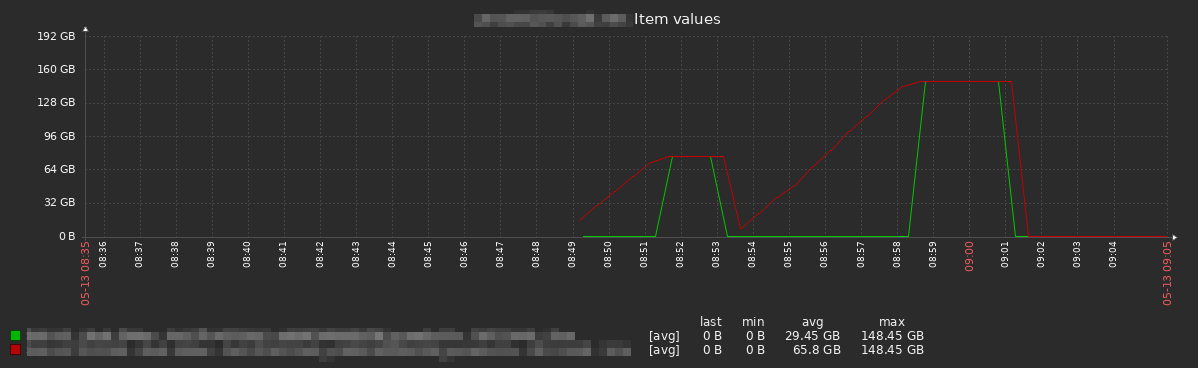
Attached is a screenshot of a graph where we monitor a folder using vfs.dir.size (green) and WMI (red).
From some cursory testing, using "Handle" from Sys Internals, I've noticed vfs.dir.size doesn't count files with an open handle where R (read) is not allowed by the application using the file. WMI shows the file sizes just fine during this. As soon as R is allowed or the handle is dropped, vfs.dir.size and WMI match up. This could explain the "delay" which is seen in the graph attached.