-
Type:
Documentation task
-
Resolution: False Positive
-
Priority:
 Trivial
-
None
-
Affects Version/s: 7.4.11
-
Component/s: Frontend (F)
Environment:
- Zabbix Version: 7.4.11
- Frontend OS: Ubuntu 24.04
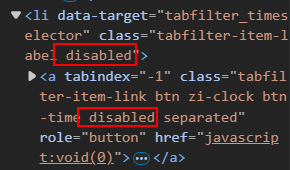
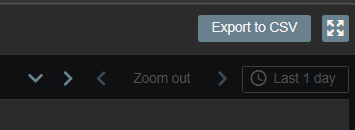
Description: The time selection button in the Zabbix frontend appears to be disabled (grayed out) and cannot be interacted with under normal conditions.
If I manually remove the disabled attribute using browser developer tools, the control becomes clickable. However, even after selecting a time range, the filter is not applied and has no effect on the data displayed.
Steps to Reproduce:
- Open Zabbix frontend
- Navigate to the Problems page (Recent Problems / Problems). Warning: the issue does not appear in the History tab.
- Observe that the time selection button is disabled (grayed out)
- Inspect the element via browser dev tools and remove the disabled attribute
- Try changing the time range
Expected Result:
- The time selection button should be enabled
- Selecting a time range should correctly apply the filter
Actual Result:
- The button is disabled by default
- Even when re-enabled manually, the filter is not applied
Additional Information:
- The issue occurs both when logged in as Super Admin and as a regular User
- Please refer to the attached screenshots/files for more details about the problem