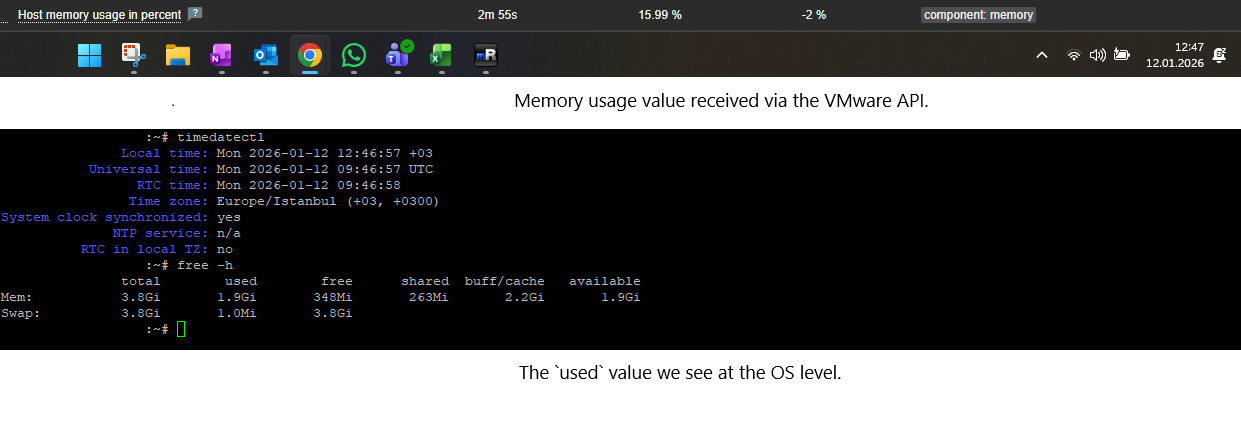
[ZBX-27277] Memory usage values collected from VMware discovery do not match the memory metrics collected from the OS-level Zabbix agent. Additionally, “Active Memory” metrics cannot be retrieved for discovered VMware VMs. Created: 2025 Nov 28  Updated: 2026 Apr 22

Status: Need info
Project: ZABBIX BUGS AND ISSUES
Component/s: None
Affects Version/s: None
Fix Version/s: None

Type: Incident report Priority: Trivial
Reporter: Yasin Assignee: Zabbix Support Team
Resolution: Unresolved Votes: 0
Labels: VMware
Remaining Estimate: Not Specified
Time Spent: Not Specified
Original Estimate: Not Specified

Attachments: PNG File image-2026-01-12-13-03-09-465.png    

 Description   

We are experiencing inconsistent memory usage values between VMware-based monitoring and OS-level monitoring in Zabbix.

Issue Details:

  • VMs discovered via the VMware hypervisor show a memory usage value that does not match the real usage inside the guest OS.
  • Zabbix Agent/Agent2 running inside the VM reports significantly different memory statistics.
  • “Active Memory” metrics (e.g., from VMware performance counters) cannot be collected — Zabbix either returns unsupported items or does not expose the metric at all.
  • The mismatch creates confusion in dashboards and alerting because VMware-based and OS-based metrics contradict each other.

Environment:

  • Zabbix Server: 7.0.19
  • VMware vCenter version: (fill this)
  • Zabbix VMware Discovery using template: Template VM VMware Hypervisor
  • OS Agents: Zabbix Agent/Agent2 on Windows/Linux (fill)

Steps to Reproduce:

  1. Discover VMs through VMware in Zabbix.
  1. Compare:
    • vmware.vm.memory.usage
    • OS-level memory usage from agent (e.g., vm.memory.size[available], vm.memory.size[total], etc.)
  1. Attempt to collect active memory metrics (e.g., mem.active.average)
  1. Observe the mismatch and missing values.

Expected Result:

  • Zabbix should report memory usage consistently between VMware and OS-level metrics.
  • VMware Active Memory should be available as an item or have a clear documented limitation.

Actual Result:

  • Memory utilization differs significantly between VMware and OS-level values.
  • Active Memory values are not available / cannot be collected.


 Comments   
Comment by Alexey Pustovalov [ 2025 Dec 02 ]

Please provide more detailed technical information, just description of the problem is not enough!

Comment by Yasin [ 2026 Jan 12 ]

1. Environment

  • Zabbix Server: 7.0.19
  • Zabbix Agent: Agent2 7.0.19
  • VMware Monitoring: VMware API via Template VM VMware Hypervisor
  • Guest OS: Linux (systemd-based)
  • Timezone: Europe/Istanbul (+03:00)
  • System clock: Synchronized (verified via timedatectl)

2. Timestamp Correlation (Important)

The attached screenshot was taken at:

{{Local time: Mon 2026-01-12 12:46:57 +03
UTC time:   Mon 2026-01-12 09:46:57 UTC}}

Zabbix VMware and OS-level metrics were checked at the same time window (±1 minute) to eliminate timing skew.


3. OS-Level Memory (Ground Truth – Guest Perspective)

Command executed inside the VM:
 

{{free -h}}
Result (from screenshot):
{{Mem:
  total:     3.8 GiB
  used:      1.9 GiB
  free:      348 MiB
  buff/cache:263 MiB
  available: 2.2 GiB}}

Key interpretation (Linux memory model):

  • Actual memory pressure is low
  • ~2.2 GiB is reclaimable (available)
  • Used memory includes cache and buffers (normal behavior)

From OS perspective:

  • Effective usage ≈ 50%
  • No memory contention or pressure

4. VMware-Based Metrics (Zabbix)

At the same timestamp, Zabbix VMware items report significantly different values:

Examples:

 * {{vmware.vm.memory.usage}} → *~15–35%* (varies)

 * {{vmware.vm.memory.used}} → does not correlate with OS {{used}}

 * {{vmware.vm.memory.consumed}} → much higher than OS usage

This leads to contradicting interpretations:

  • OS shows memory is healthy and available
  • VMware-based metrics suggest lower or inconsistent usage
  • No single authoritative value exists for alerting

5. Missing / Unsupported “Active Memory”

VMware defines Active Memory as:

Memory actively touched by the guest OS within a time window

Observations:

  • “Active Memory” is visible in vCenter performance charts
  • However, Zabbix:
    • Does not expose mem.active.average
    • Or marks it as unsupported
    • No clear documentation states this limitation

Because of this:

  • VMware-based memory metrics cannot reflect real guest activity
  • OS-level memory and VMware memory fundamentally diverge

6. Root Cause (Technical Analysis)

This discrepancy is not a bug in the OS or agent, but a semantic mismatch:

Source What it measures
OS Agent Guest-visible memory usage & availability
VMware API Hypervisor allocation, ballooning, sharing, reservations

Without Active Memory, VMware metrics:

  • Cannot represent guest memory pressure
  • Are unsuitable for alerting without clarification

7. Impact

  • Dashboards show contradictory memory usage
  • Alerts based on VMware memory are unreliable
  • Operators cannot determine which metric is authoritative
  • This creates operational confusion in production environments

8. Requested Clarification from Zabbix

Please clarify one of the following:

  1. Is VMware Active Memory intentionally not supported by Zabbix?
  1. If yes:
    • Please document this clearly
    • Provide best practice on which VMware memory metric should be used
  1. If no:
    • Please advise how mem.active.average can be collected correctly
    • Or confirm if additional API permissions/configuration are required

9. Conclusion

At the moment, there is no consistent or reliable way to correlate VMware memory metrics with actual guest OS memory usage in Zabbix.

Until this is clarified, OS-level memory metrics are the only trustworthy source for alerting, while VMware-based metrics remain ambiguous.

Comment by Tomasz Grzechulski [ 2026 Mar 16 ]

hello,
what version of VMware template is used? this information is visible in templates section, in column "version"

Comment by Yasin [ 2026 Mar 17 ]

Hi tgrzechulski ,

Version 7.0-2 is being used.

Comment by Yasin [ 2026 Apr 22 ]

Hi tgrzechulski ,

Following the request for deeper technical details, we performed direct validation against the VMware API using the govc CLI tool (which uses the same vSphere API as Zabbix).


1. VMware API Validation (Independent from Zabbix)

We verified that Active Memory metrics are actually available at the VMware level:

govc metric.ls "/Datacenter/vm/ZabbixNew/vmzbx01" | grep mem.active

Result:

mem.active.average

We then successfully retrieved the metric:

govc metric.sample -n 1 "/Datacenter/vm/ZabbixNew/vmzbx01" mem.active.average

Output:

mem.active.average 335544 KB

This confirms:

  • VMware does collect Active Memory
  • The metric is available via vSphere PerformanceManager API
  • There are no permission or API limitations

2. Zabbix Behavior

Despite the metric being available in VMware:

  • Zabbix returns:

Unsupported item key

  • Attempts with the following item keys failed:

{{vmware.vm.memory.active\\{$VMWARE.URL},\\{$VMWARE.VM.UUID}
vmware.vm.memory.size.active\\{$VMWARE.URL},\\{$VMWARE.VM.UUID}}}


3. Root Cause (Technical Explanation)

Based on investigation:

  • Zabbix does not dynamically query all VMware performance counters
  • Instead, it uses a fixed internal mapping (hardcoded in source code)

This means:

 Even if a metric exists in VMware (e.g. mem.active.average),
 it will NOT be available in Zabbix unless explicitly implemented


4. Key Limitation Identified

  • mem.active.average is:
    •  Available in VMware API
    •  Not exposed by Zabbix VMware items

Therefore:

Zabbix cannot retrieve Active Memory at all, regardless of configuration


 5. Implication

This explains the original issue described in the ticket :

  • OS-level metrics → reflect real memory pressure
  • VMware metrics → reflect allocation/consumption
  • Missing Active Memory → prevents proper correlation

 6. Conclusion

  • This is not a configuration issue
  • This is not a permission issue
  • This is not a VMware issue

This is a Zabbix limitation in VMware integration


Requested Clarification

Could you please confirm:

  1. Is mem.active.average intentionally not supported in Zabbix?
  1. If so, could you provide:
    • Recommended metric for representing real memory usage
    • Best practice for alerting using VMware metrics
  1. If not, is there any way to extend Zabbix to collect this metric?

Additional Note

Given the current limitation:

OS-level metrics (via Zabbix Agent) remain the only reliable source for:

  • Memory pressure
  • Alerting decisions

VMware metrics alone are insufficient without Active Memory.


Thank you.

Generated at Wed May 13 17:32:29 EEST 2026 using Jira 10.3.18#10030018-sha1:5642e4ad348b6c2a83ebdba689d04763a2393cab.