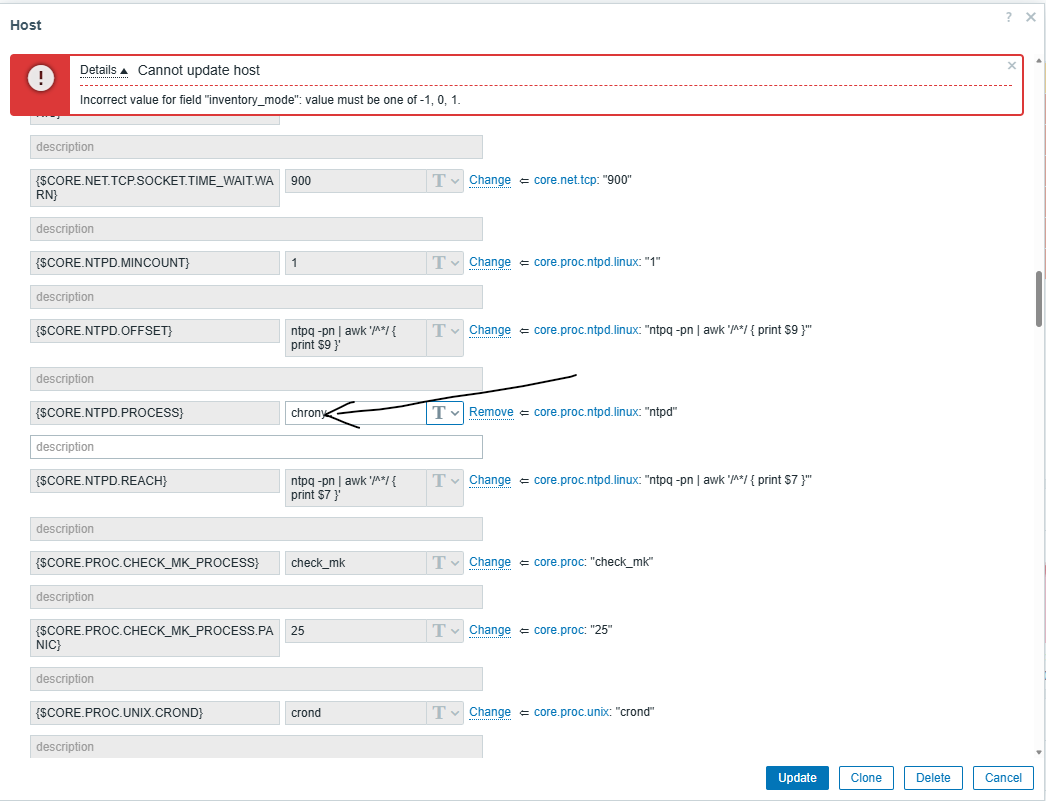
Host inventory issue causes error when updating host-level macros on specific manually created hosts.

XMLWordPrintable

    • Type: Incident report
    • Resolution: Unresolved
    • Priority: Trivial
    • None
    • Affects Version/s: None
    • Component/s: None
    • None

      Steps to reproduce:

      1. Open a problematic host in Configuration → Hosts
      2. Go to Macros tab
      3. Modify the value of an existing macro (e.g. from ntpd to chronyd)
      4. Click Update

      Expected result:

      Macro value is updated successfully without any errors.

      Actual result:

      Update fails with host-inventory-related backend error shown in UI and debug panel.

        1. image-4.png
          image-4.png
          79 kB
        2. image-1.png
          image-1.png
          79 kB
        3. image.png
          image.png
          79 kB

            Assignee:
            Wojciech Rawicki
            Reporter:
            Michal Laga
            Votes:
            1 Vote for this issue
            Watchers:
            2 Start watching this issue

              Created:
              Updated: